THE DAILY STREAM

Mike's site

Stuff and things

Latest updates
Newest first

Harrison Mixbus first impressions

I've never worked on an analog console. Sure, I've sat with someone and suggested technical and creative engineering decisions while they operated, but the UI paradigm of a console is only useful to me because I've used desktop mixers, and because pretty much all DAWs use some form of this paradigm. I don't have any allegiance to the old ways or the "sound" factor that usually consists of a bunch of vague assertions that analog summing is better (usually coupled with assertions that tape is better as well).

But what I do have is that drive to find the better workflow, the fastest way to creativity mixed with the ability to generate results. I also can't pass by a deal. For a $20 "no brainer" deal, it was certainly worth trying out Harrison Mixbus, even though Pro Tools is the standard and is a generally satisfying experience once you learn it.

The origins of Mixbus are interesting enough on their own: the project was born from an open source Linux DAW called Ardour. The Harrison console company, known for their super high end consoles used on a huge amount of popular records, used the existing open codebase as a skeleton that they fleshed out with their own EQ, compression/leveling, saturation, and summing algorithms.

Out of the box

Installing is a minor pain due to the requirement of a JACK installation, and subsequent restart. JACK is a system-level audio router that's somewhere between Soundflower and Propellerheads' ReWire. Apparently Ardour needs it to route from an audio interface to its own tracks. This means the JACK server, really a separate piece of software, has to run at the same time as Mixbus, but a side benefit is that audio can pretty easily be routed into it from other applications.

Why's that important? Well, to me it's important because Ableton handles all of my composition work, and Ableton is not that great at mixing compared with a package like Pro Tools. Unfortunately, ReWire mode in Ableton disables all the VST/AU plugins, rendering a good chunk of my instruments unusable. So I usually end up rendering audio tracks from Ableton and mixing those in PT, which is not necessarily going to get me the best results, aside from being a crappier workflow. I haven't yet gotten Mixbus controlling the transport in Ableton, but it does seem possible.

UI

Ardour was built originally for Linux. Thankfully, the Mac OS version does not require X11 or a Java VM. It hardly appears "native," though. The reverse-color scheme, the Gnome-style file pickers and very Linux-y UI components are alien, distracting, and not very impressive. Keyboard shortcuts aren't intuitive either: some are borrowed from Pro Tools and that helps, but system-wide commands like Command-backtick for window switching, or even Command-W and Command-H, are nowhere to be found. Many of the commands use Option as their modifier key, which is awkward. Still, a lot of the editing functions are single-key, something that absolutely has to be the case before a DAW can even sit in the same room with Pro Tools. I suppose I could probably re-map them to their PT equivalents, too.

By far the thing you'll notice about the UI the most is the mixer. I've written about skeuomorphs in audio software before, and it's all the same here. Harrison love to tout that they're a console maker, not a software maker, but that works both ways, and their application of a heavy, quasi-realistic mixer design has me gazing longingly at the screenshots of Ardour's relatively clean and straightforward (almost Ableton-esque) mixer. But as they'll tell you, this is a thing meant to replace an analog mixer, and the affordances (in the Norman sense) offered by the skeuomorphs help the special features come forward. In a way, it seems like they're intentionally reaching backward, and you can feel it when you mix.

Fast Access

First off, there's the impressive list of built-in elements on every channel strip, and I admit this is something that I'd probably miss if I were coming from the console world. I'm already enjoying them. In a typical DAW, pretty much everything, with the exception of EQ in some cases, is a plugin.

But in Mixbus, we get a lot:

  • Input gain independent of the fader or the clip gain.
  • a 3-band parametric EQ plus high-pass filter.
  • A compressor with three ratio types, speed control, and makeup gain. The threshold control and gain reduction meter sit right next to the fader and level meter.
  • A number of parameters from the selected insert plugin on the channel.
  • On the 4 mix busses and one master bus, there are tape saturators and different compressors tuned for the purpose.
  • On the master bus, a phase alignment meter and "K-meter" to measure perceived loudness.

What all of this accomplishes is a mix process that involves far less instantiation of plugins, far less opening of separate windows, and a workflow that keeps you looking at the mixer and maintaining a holistic picture of the mix most of the time. This is of course Harrison's goal, and I think they've met it well.

The major downside to this mixer is that there are only 4 "mix busses." You can add any number of busses for reverbs and other effects, but only the mix busses have delay compensation. That means a lot of multiple-bus tricks that analog and PT users employ, such as parallel compression, are out of the picture due to the phasing that'll happen without delay compensation.

But how does it sound

Again, I admit to knowing little about the console world. I've never wired one, and my understanding of routing and bussing comes largely from years of Pro Tools. Mixbus mirrors the real thing even more closely than PT, which provides both benefits and limitations (as with the limited mix busses). So what does it do for the sound?

I have to say, I've been impressed so far. But I'm not quite sure if it's the much-touted Harrison summing engine or whether the availability of the tools has let me get a good mix faster. Having EQs out front is important because you're tempted to use them. And most tracks are really going to need at least a little, but that tiny thought that pops up when you add a plugin creates enough of a barrier that you might skip it. And when you do add a plugin, it's probably going to have quite a few bands, and a distracting graphical display that makes you think you're doing something right because the curve "looks good" even though you might need more or less on a given band. Mixbus's basic EQ has two shelves and a bandpass that work in limited ranges, a Q that varies based on the amount of boost/cut, and a high-pass. Simple. No controllable Q, no ability to put all 3 bands in the high frequencies and create an insanely hyper-tweaked situation. Of course you can still do all that with the same plugins you know and love now, but you can get a really good mix just by carving each channel as necessary and then applying little touches of the onboard compression.

Performance

Unfortunately, there are some problems on the performance front. I was able to do some very quick mixes efficiently that sounded great without a lot of hassle, but with tunes that had about 6 tracks and not a lot of plugins (thankfully, you don't need as many plugins with Harrison). But when a client delivered me some songs with 27+ tracks to mix, it died pretty quickly. The meters don't respond, moving knobs and faders ceases to really do anything — the latency all around just gets ridiculous.

Side by Side?

At the end of the day, Pro Tools still has a lot going for it. I find myself doing a lot of wild and (IMO) creative stuff in PT when it comes to routing and bussing, stuff you just wouldn't be able to do with an analog console — or a DAW that mirrors one too closely.

And though I don't do a lot of MIDI work inside PT, I definitely have done some, and it's good to know it's there. I can add a nice synth to a track without going crazy routing multiple programs.

Mixbus also has some good editing tools, some of which are minor UI innovations and others of which are cribbed from PT, but PT is a much faster and more powerful editing machine. It's also one that I know already whereas I've played with Mixbus for about 3 days. I've no doubt I could get pretty handy with the flexible editing functions in Mixbus as well.

At the end of the day, it's a great mixer, competent editor, and it sounds very good with no supplemental software. If you're looking to make great sounding tracks for a lot cheaper than Pro Tools and don't need MIDI functionality beyond sync, it's a really compelling tool.

And it's fun.

(Harrison's YouTube channel is an easy way to get started playing with real practical functionality within a few minutes. The videos are short and informative, and even have some helpful general mix tips.)

Discuss

Diego Stocco's Rhythmic Processing

Diego Stocco is an Italian sound designer who's worked with, among others, Hans Zimmer. He's perfected a fairly interesting technique of processing sound sources with some rhythm into multiple tracks of kick-snares, bass, and clattering beat-repeaters.

Recently he started selling his secret sauce in the form of some impulse responses for convolution reverbs as well as a $10 instructional video, Rhythmic Processing.

I thought I'd try it out.

The basic premise of this short (under 10 minutes) video is that Stocco plays a rhythm with a chopstick on an acoustic guitar, then walks you through his Ableton Live effects chains to show how he turns the whole thing into a massive beat with tons of variations and atmospheric textures.

The first thing you'll notice is that he's efficient — this thing requires a lot of pausing to look at the settings of the plugins. That's fine, I'm sick of overly long YouTube tutorials.

His method is basically to take the sound and split it, using EQs and filters, into multiple bands on multiple return channels in Ableton. This is a technique I've used in Pro Tools for complex "fixing" on already-mixed sources (I don't have any dedicated multiband processors), but as a creative exercise it's pretty neat.

Stocco doesn't prescribe any particular plugins. However, non-advanced Ableton users may balk at the fact that a couple of the plugs he relies very heavily upon cost money.

There are, however, free sequenced gates out there for VST and AU, as well as a few "trance gates" on the NI User Library if you're into Reaktor. For the ultimate no-cost sequenced gate, just place a standard Ableton gate effect in place of Stocco's plugin and feed a sequenced percussive sound into the side chain. Not tough.

Is it worth $10? Well, it's nothing that someone else might not be able to show you, but Stocco is known for this stuff and it's worth a glimpse under the hood. The video is very short, and that may put some people off, but it's very dense in information. I felt pretty inspired.

Discuss

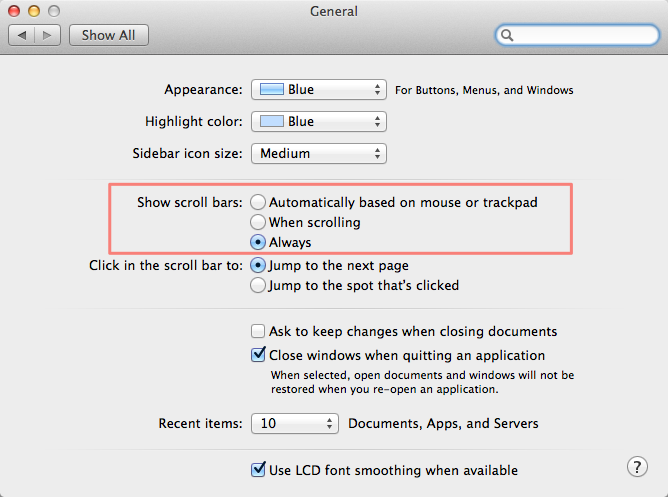
Hey screen designers on Macs

You should do this.

Scroll

Obviously different OSes have different scrollbars, but you'll save yourself a lot of trouble and possibly spot some HTML mistakes before they get bad from just knowing they're there.

Discuss

The enemy of done

I'm sure that you've heard, at some point, some wizened sage say a thing about how limitations are helpful when it comes to creative endeavors.

Probably it was someone like Frank Zappa who didn't practice what they preached, but this isn't just "good for you" advice; it can be fun.

What simplification means in a creative sense can be up to you: it could mean limited tools, a smaller palette, a shortened time frame, or really impractical and artificial constraints meant to "get the juices flowing" (e.g., I'm only going to use MS Paint or build a song with presets from early 90s synths). But as an exercise, it's one thing; adopting simplicity as a way of working is a freeing experience.

After a some great frustration playing in a large band with intricate arrangments, I decided to simplify my musical existence by going back to a one-man show for a while. But that tends to be a rabbit hole for me. I love choices and hate limitations. I don't necessarily feel like I need to use my whole toolkit in every project, but I want to know I can start anywhere. The problem often is in starting, though. A limited palette can make that easy.

So I've created a much smaller subset of tools: two sampled analog drum kits, a Volca Keys, a '73 Roland SH-1000, a Reaktor-based Minimoog emulator, and a MeeBlip SE. It's a kind of weird hybrid of real and simulated analog, and it's all really cheap. It also feels like a pretty wide sonic palette right off the bat, but I do need some kind of variety because I tend to write synth lines based on the qualities of a particular sound. The Minimoog has enough variety to spark something unique, but picking from two drum kits means I'm laying down a beat in 5 minutes instead of auditioning sounds and building kits for 40.

Over the weekend I wrote a complete song during the baby's nap time. A couple hours and everything was done. Beat, bass, lead line, effects, tricks, vocals. Done.

A nice side effect

Something that I discovered from going limited is that simplicity isn't the only benefit — the inability to achieve perfection has opened my mind quite a bit. I've kept the SH-1000 out of my sets for anything other than some noisy filter effects because it's monophonic, hard to play, hard to keep in tune, and doesn't have MIDI or the ability to save sounds. With Ableton, I don't need MIDI or patches: as long as I can adequately play a loop one or two times through, I have a bass or lead line recorded as audio. The key here is adequate. It's not going to be perfectly synced, and even if I played it perfectly it wouldn't necessarily register with the 40-year-old raggedy-ass keys and the tuning would still be wonky. The Volca's similar: it can be synced to MIDI, but it can't save sounds either and the tuning tends toward unpredictability.

So this stuff means my music isn't perfect. But it's also got some character as a result. Aside from how you feel about tweaking sounds or cutting loops precisely, whether these things improve your music, there's one thing you can't argue with: I finished something. Quite a few somethings.

There's a saying that "good is the enemy of great." That's true, and you should always keep your standards high and your goals lofty — but remember also that perfect is the enemy of done.

Discuss

Tweakin'

I often wonder what the intersection of my two primary interests — UX and music — might be. Unfortunately, it usually seems like the main manifestation of this is in the obsessive tweaking of processes and tools.

It's probably natural for UX designers of a certain experience level to engage in service design thinking. You eventually start to think about the holistic world rather than just the point where a customer touches a software interface. But then again, it could very well be that the obsessive desire to have the perfect experience yourself is the driver of that kind of thinking. It's a chicken and egg situation, but whichever came first with me, my point is this: I'm constantly editing my tool chain.

The answer may very well be in simplicity (more on that at another time), and it definitely lies in compromise. I'm just not sure there's a really perfect process. Transparent tools that don't make you think are pretty much the ideal for creatives — for instance, in a live situation, tools that keep you from touching the laptop trackpad. That's why I bought an Akai APC40 controller for Ableton on Craigslist, but of course I still have to open new files, and that's a source of inaccuracy and anxiety onstage. So I've been trying to crack that nut. The quest continues. And in the meantime, I use the hardware equivalent of a polyfill, something that a layman might call "a trackball on stage."

Same in the studio. My best purchase of the past year was not a plugin or piece of hardware but a set of $10 keyboard shortcut stickers for Pro Tools. It eased my learning and enabled me to work much faster, especially in the editing stage of a mix. The up-front setup (about an hour peeling and sticking these little nightmare labels), analogous to say, setting up a new project management software, made every subsequent day a little easier. Until I ruined the keyboard with a beer spill. Don't drink and mix, kids.

Same with design. I've been playing with Sketch and ended up buying it because of the insane speed it offered me in a few key areas after just a short learning curve. The paradigm shift is just different enough that it mirrors Ableton: a program that is indeed a DAW and has mixer sliders but requires a completely different thought process from the old-school Pro Tools/Cubase mentality. Sketch is definitely a design tool, but it's been honed and trimmed back to incorporate only the elements you need for the particular type of design you're doing; in this case, it's screen design. But... there are holes. It doesn't do bitmaps at all, I mean at all, even compared to Illustrator. so I lose the valuable hybrid "don't think about the vector/bitmap divide" approach of the otherwise-clunky Fireworks. Which means that again, my process is incomplete and I have to fill in the gaps with workarounds and additional tools.

So what's the answer? I don't think there is one. If I rewrote this post next year, I'd be talking about different tools but it'd look remarkably similar. At some point you have to settle for "good enough it's not in my way," but it's still worths striving for the zen happy place of "perfection."

Discuss

The Equals

I've always liked to trace the origins of musical artists and their tunes. It's probably one of my nerdiest hobbies -- I can't really come down on anyone who memorizes worthless sports stats because I know which Current 93 record Steve Ignorant of Crass sings on and the years each of Neil Diamond's Hot August Night live albums were released.

This was a lot harder before the internet; most information came in the form of serendipity when a recognized name cropped up in liner notes.

Since the advent of the web and standardized sources of info, it's easy to trace origins. But sometimes because there aren't any liner notes anymore (if you're buying mp3s or streaming), little tidbits and cover songs can slip through.

That's the case with The Equals: I hadn't heard of them but when I heard a loud glam-rock stomper by them on KOOP, I looked into it. Not only was the singer Eddy Grant the guy who lodged "Electric Avenue" in our collective brains, they had a pretty solid influence on the Clash. Here's the original version of another ahead-of-its-time song the Clash did a great job with, "Police on My Back."

I guess as long as there's music out there, it's possible to be surprised every once in a while still. Thankfully.

Discuss

Photo Shooting

I've been working with the talented Kyle Woods over at Skyking Photography to start promotion of my new musical project.

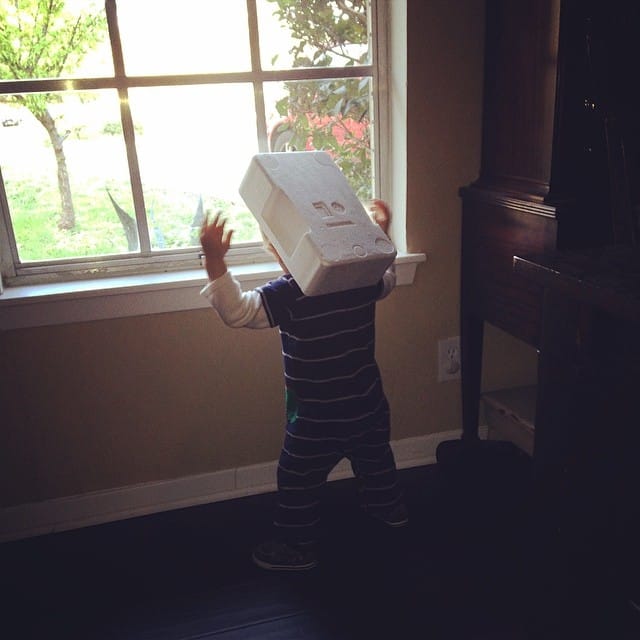
He had some really interesting and creative ideas that I think captured the feel of my music. I can't show too much at the moment but this is a piece of the set. Check out those shadows!

Photo set
Discuss

Uh oh

A new blog again.

I briefly tried Octopress, a variation on Jekyll that generates a static-file blog. It's the bees knees in principle but I just can't make all the Ruby dependencies work. I've gotten into a lot of compiled web technologies lately; it's mostly Node-based stuff like LESS, Jade, etc., but this made me feel a little like an idiot. At the end of the day I'm a designer.

I'm really into the idea of Tumblr in some ways — namely speed, ease, and price — but the whole concept of being hosted by one of the big guys has started to get a little weird in the wake of Snowden, and I'm actually looking to do something a little more high-touch than just "Reblog this" and "click the bookmarklet here."

And now, the rise of cheap clouds like Digital Ocean have enabled a lot of flexibility for someone with some general tech knowledge (but not enough to use a Ruby-generated static site with Github for "blogging anywhere").

So I'm trying out Ghost.

WordPress is just not an option anymore, because it's an awful, heavy, security-hole-ridden mess that is fine for pushing on a client with a shared hosting environment but if you just wanna blog? not so much.

I do think my friends who watch my blog are pretty much limited to "the ones using Tumblr also", so I can't say whether moving away from it is a plus or not.

I'll probably make my own theme before too long, but I don't really know Handlebars and such, so right now this one's pretty nice.

At any rate... Off I go.

Discuss