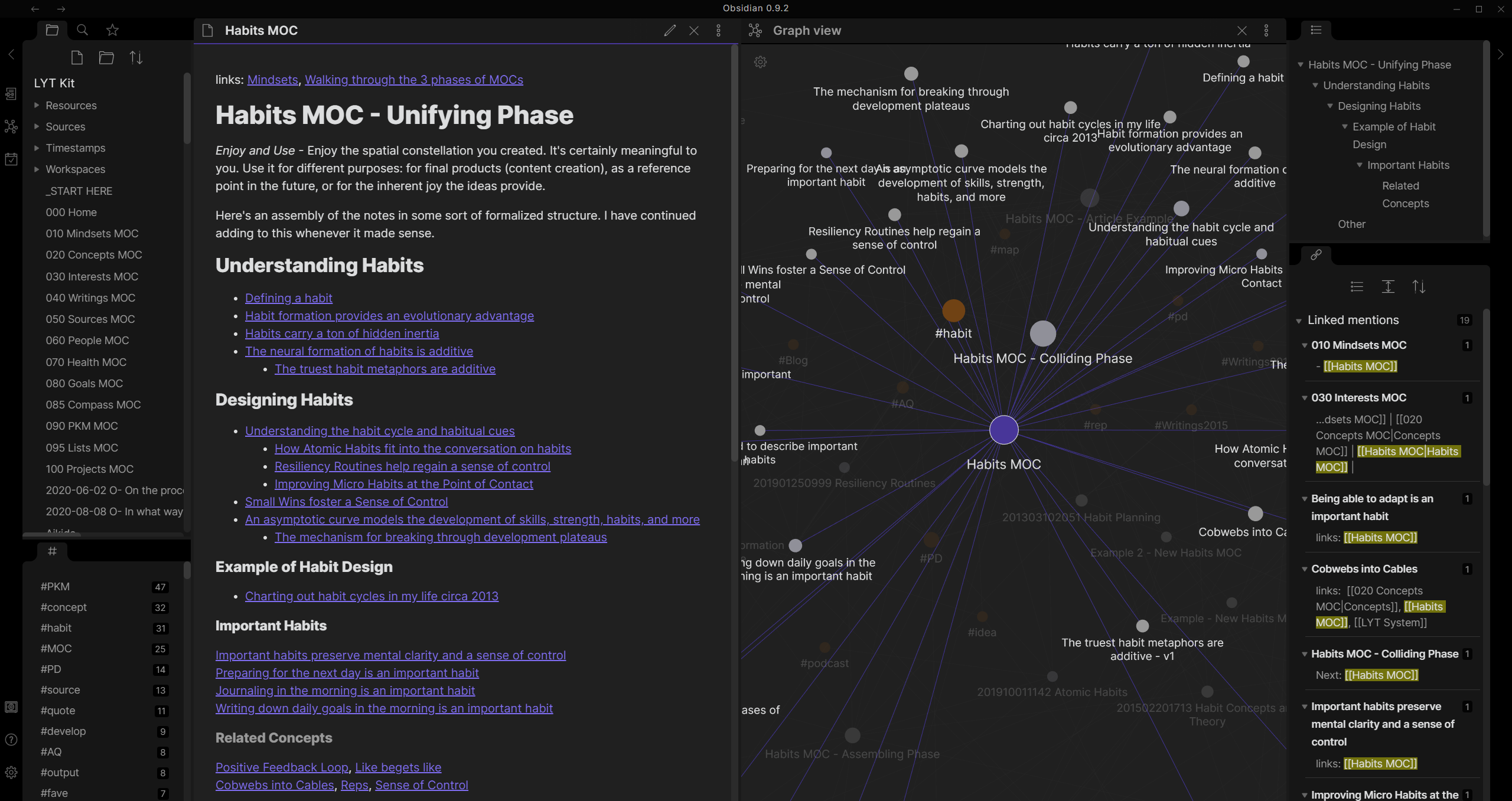
I'm definitely not alone here but finding the perfect toolset is a slight neurosis of mine. And I thought I had it with Typora, a flat, local markdown editor with a notebook view and cross-platform access. But along comes a reference to Obsidian — in our local Nextdoor of all places — and I feel finally ready to move things off Notion and out of the cloud.
Obsidian has a lot of great features on top of being a markdown notebook, including:
web-less encrypted sync
images
wiki-style internal linking
a nifty graph of all the links
mobile version
plugin architecture with a very active community
CSS-based themes
The one thing it lacks from Notion is a database, but increasingly I find that the kitchen-sink approach isn't working for me. I just want structured text with images, and I can go to LibreOffice Base or Airtable to organize data.
If you're like a lot of designers, especially young enthusiastic ones or possibly freelancers with time between projects, you love to organize and beautify your systems. I've made a new CSS theme for my markdown editor! I built a home page for my browser that beautifully links to my current projects and most common pages. Etc.
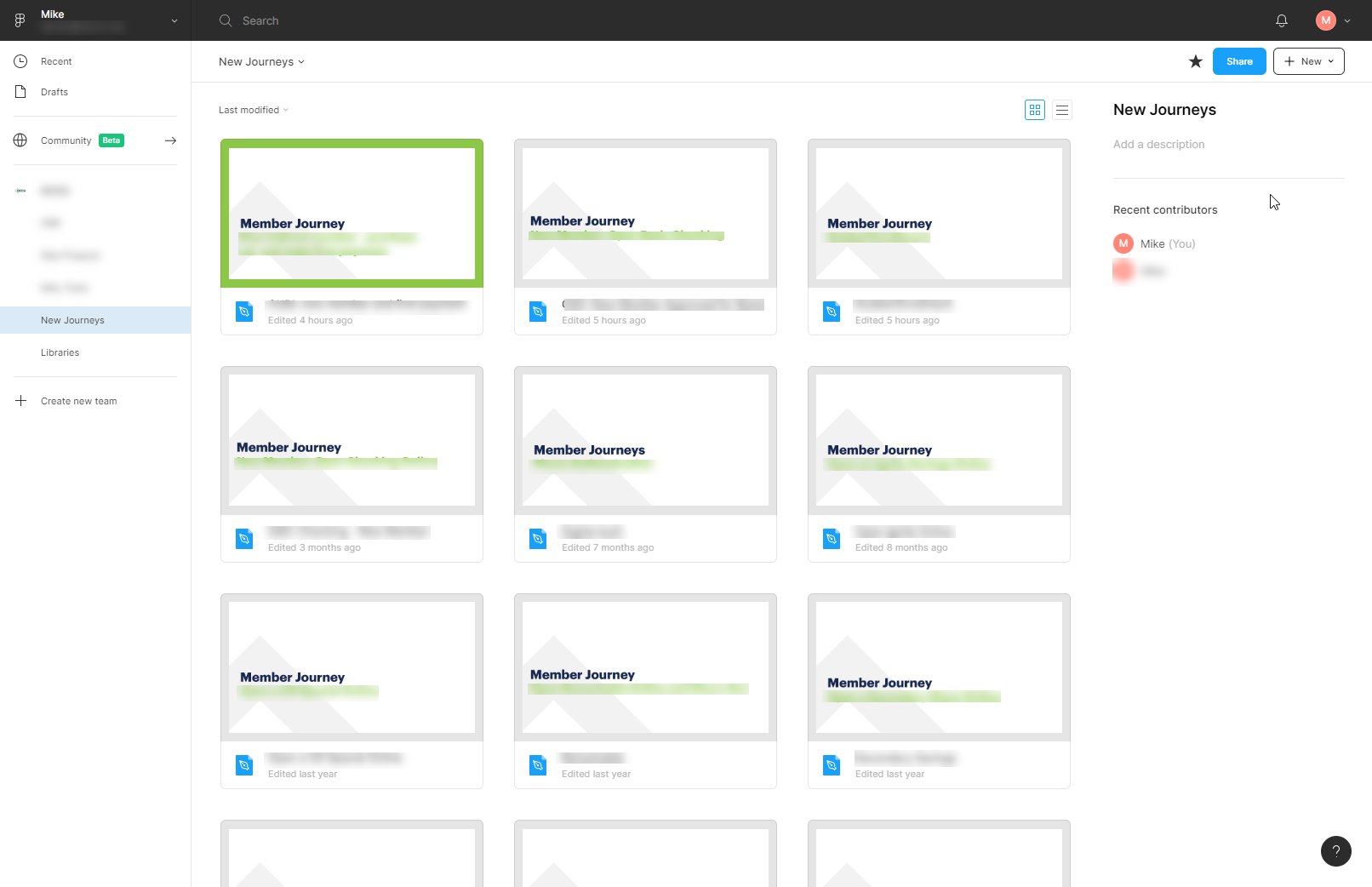
One of the big offenders in the mess of my work life is the list of Figma projects. It'll always be preferable to the classic joke of design_final_final_r2__final.sketch that anyone still in pre-Figma world is probably still dealing with, but it can be rough on the eyes.
I came up with something that works well for me.
Firstly, you have to give files a cover page. Just do it. Mine use a frame that is 1240px x 660px.
Each Figma project is actually a project category: Online banking designs, public web page designs, internal software tools, customer journey maps, and libraries. Within those, each has its own style of cover page. This gives each listing page a unified feel and it's always obvious which list I'm looking at.
I use the default gray background on the cover page, unless it's something I'm actively working on at the moment. Then I change it to green. This gives the cover a green border around it in the listing page.
Create components for those covers in case you feel like you might want to change them down the road. Et voila, you've really simply gone from a mess in your projects list to an organized and legible design portal.
I've now been on Windows at work for 3 years and finally found a notes solution that seems to work. I have a weird set of requirements:
I want it to look reasonably good if I'm looking at it all day
It has to support Markdown
It should support images
It should have a "notebook" interface
It can't use web sync because I work at a financial institution
I can't run installers (unless they're single-user) because my work machine is locked down
Finally, I found Typora. Insanely, it actually meets all these requirements, including a great notebook-style interface when you open an entire folder. Plus it has a few other features:
Document outline
Multiple themes (most of which aren't super great)
Export into HTML, PDF and all kinds of other formats
If you're on Windows or Linux, give it a shot. It's on Mac OS as well, but Mac users have such a glut of great markdown editors and notebooks (Bear and Byword are still among my favorites) that I'm not sure it's worth mentioning for them.
Update: I have moved away from Typora in favor of a complete knowledgebase approach of Obsidian, which is far more of a "notebook." Plus Typora has a cost and I can't buy stuff like this for my work machine.
They said it couldn't be done — removing yourself from Amazon. In truth, it mostly can't. If you use almost any web-based service, you're using AWS. And if you're like me, stretched out across multiple different platforms, you probably use some of those. But we stopped shopping there, I got a Kobo, and we're on the way to replacing our smart speaker. Honestly? Not that hard. Prime video is about the only true difficulty, especially since they have Star Trek
So, riding high on this pseudo-victory, I have declared I'm going to remove Google from my life.
Hashtag #goals
Here's the deal, though. I've read posts like this from people more tech-savvy and smarter than myself, and I don't think I can go that hard. It sounds... tough. I just want to stop depending on them, stop letting them see everything I do, and generally stop supporting them. There are so many reasons out there for doing so, but that's not what this is about. This is about a quest for alternatives to the company that practically wrote the book on doing stuff in the browser.
The pieces
Once you start cataloging it, there's a lot. And some are just gonna have to slide, no doubt about it, but I'll get there eventually. Here's where I'm at with alternatives.
Gmail. I looked at Proton, which is great if you really want to get into the extremes of privacy, and a few others, before settling on Fastmail. Fastmail won out for its UI, pricing to storage ratio, and inclusion of a calendar. Some friends' recommendations sealed that deal. Fastmail also features alias boxes, which can send or receive mail, and those are helping me get rid of the numerous random Gmail boxes in addition to the main one.
Docs. At the end of the day, I so rarely need a word processor and almost any will work. My personal hangup about docs is that I usually want structure rather than WYSIWYG layouts. It's a big part of why I use Notion Obsidian and frankly in most cases I'll just publish a PDF out of there. I write my post drafts in there since it's Markdown. But Apple's Pages online and MS Word online are totally fine, and more recently I found the hosted version of open-source OnlyOffice. As a bonus, it's a great replacement for the aging and frustrating LibreOffice on the Linux desktop.
Sheets. When Google Sheets launched, it was insane. Zoho had done it, but not well, and that's about it. There are all kinds of great tools out there now that make a spreadsheet seem quaint, but sometimes you just need a spreadsheet. It's still the "killer app." And the originator is still pretty good at it. Excel online is a little more computer-intensive, but it does the thing well and doesn't get into other stuff. Coda is a possibility, but the learning curve is steep, and I've seen recommendations for Airtable but as cool as it is (I use it for a few things) it's really a different animal. OnlyOffice wins again, for anything that needs more math and fewer relationships than I would handle with Airtable.
Drive. My god, it's full of storage. There are so many alternatives out there it's not even worth it. If you want to use the same provider as your docs or sheets, then go with Microsoft or Apple. If privacy is your main value, try pCloud or Mega. I've personally gone with pCloud because of its media capabilities and generous size (not to mention its charmingly rough edges and desktop Linux integration), but my eggs are well distributed among many baskets.
Photos. Unlike email, there just aren't a lot of low-cost storage options for photos. Flickr has been so fucked-with for so long since Yahoo! took over that I can't make heads or tails of where they're going with it, and most services (that aren't AMZ) are geared toward photographers, not regular folks backing up their stuff. So for now, I have nothing except redundant external drives and possibly a larger pCloud plan.
Chromebook. Obviously Google tracking your entire operating system is not super ideal. However, this was easier to resolve than I expected. Crouton makes it easy to install a Linux environment with xfce. I'm still tweaking but it's working pretty well, especially considering my Chromebook runs on a Rockchip, which I think is like an ARM?
The world of technology used to be this way. We used the best provider for each service or application. The idea of going to a one-stop shop is relatively new. Yeah, it makes things simple, but if the price for turning computing devices into dead-simple consumer electronics is all my privacy, I'm going to try to roll my own life.
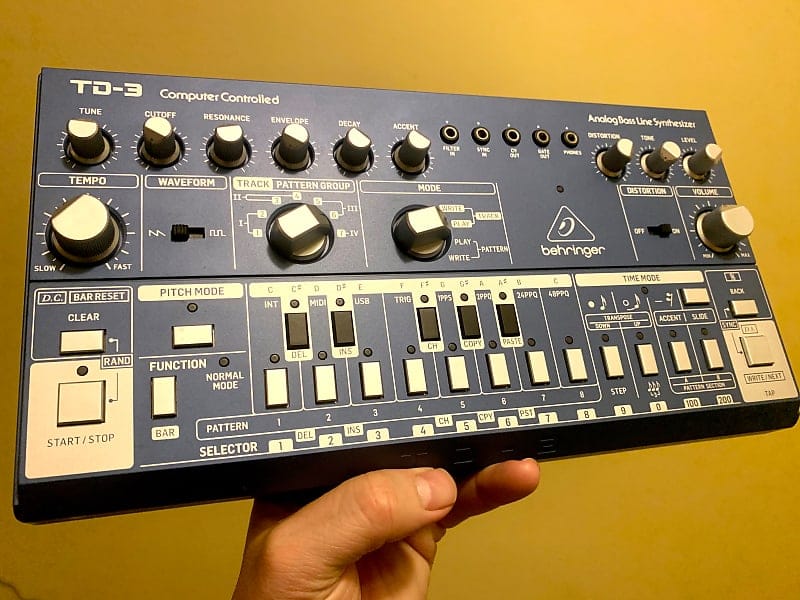
It's pretty safe to call Behringer "much-maligned." Obviously they have a tendency to do the cheap imitation version of gear, and Uli seems like kind of a dick. But rather than Mackie mixers or random pedals, they've set their sights in the past decade on the unobtanium of electronic music stuff. The Minimoog, the ARP 2600, the 808. And one of the recent ones is the Roland TB-303.
I picked one up on Reverb for under $100 shipped, so it's kind of hard to say no. It goes well with my other small, cheap desktop modules like the Volca series and Arturia Microbrute. It is, however, a bit flimsier feeling than the others. But I've been assured by some owners of the original that it was also a plastic box that you wouldn't want to drop from too far up.
Sounds
So how does it sound? There are plenty of YouTube videos at this point, but more than any other piece of synth gear I have, it does One Thing. It does that thing right, though. There are two wave shapes, the saw and square, and simplistic filter controls that were meant for guitarists rather than subtractive synth experts to work. The TB-3 adds a nice distortion option that the 303 lacked, and it really helps the bass cut through a thicker mix. I almost never turn it off, especially on the square wave shape. There's also a little patch bay at the top that lets you do some very basic CV controls. I could probably sync the filter to the kick pattern of the Volca Beats or send gate info to the Microbrute arpeggiator, but I have yet to play with it.
Sequences
The one thing that I almost wish wasn't so authentic is the sequencer. It works by programming notes, then by going back and programming all their lengths, including rests and holds. You really have to plan out your patterns in advance before starting to punch buttons. Fortunately, you can switch the thing into pitch mode and send it notes from somewhere else, like Ableton Live or my Alesis MMT-8 sequencer.
Summary
Those folks who automatically won't buy Behringer aside (I get you), the TB-3 isn't a device for everyone. It only does one thing, and chances are it'll makes you think of acid house as soon as it starts playing. But if you need bass in your setup, you could do a lot worse than around a hundred bucks for something that can shake the floor.
I think I'm going to maybe do some blogging again? I've always had trouble with writing in the blog because I feel like it should be about UX. I generally want to write about synths and studio stuff. It is what it is. I'm now officially Too Old to be concerned whether potential employers look at my portfolio, see my blog, and realize that I don't spend every waking hour thinking about designing software. Also, I'm not really looking.
I suppose I was fortunate, really. My band's drummer, who also wrote maybe 70% of the guitar riffs, finished his PhD and left the country to go work in Switzerland. Writing out that sentence makes me realize he was the really fortunate one. But what I mean is, a lot of my musician friends had to deal with the fact that they couldn't get together during the pandemic. For better or worse, I didn't have a band anymore to worry about. Fortunately, prior to 2020 I'd released about a dozen releases (between digital, CD and cassette) over the past 20 years that featured no other musicians but me. So I started to hit the shed.
I've been a process musician for most of that time. Each project, each release, is the result of a way of working. It comes from being in the experimental world for so long. Now, even when I make something that I find enjoyable to listen to, it's still gonna be made via a specific process. And when I make something with that process, I tend to move on. But that kind of indulgence is tough for someone with kids and a day job. Movement doesn't happen quickly enough, and output is minimal.
So I came up with the plan of forcing myself into the shed once a week, and I decided I wasn't going to come out of the shed until I had a finished song. Talking it out with a friend, I realized this accomplishes a few things:
It opens the throttle on that speed of progress. If you just "play around" once a week for a couple hours, you're not going to get anywhere for a long time. Validating an idea once a week gets you through the ruts and the familiar patterns and into new ideas sooner.
It keeps you from being precious about polish and "finish." The dumb truth of a piece of music or art is that it's finished when you say it is. Bee Thousand is just as "finished" as Dark Side of the Moon, and they're both classics of their space. One was made by a group of guys with infinite time and money, and the other was made by a drunk schoolteacher with kids.
It makes you go with your gut. Maybe if I hadn't been doing this for close to 25 years, I wouldn't feel like the gut was a useful thing. But the gut has become experienced.
I'm currently using this process to create new Various Reasons tunes, always with the further constraint that someday they can be recreated live, but the first work I did with a "live band" style and put onto Bandcamp as Mezzo Cortex.
Like any mediocre guitarist, I spend a lot of time rethinking my tone and my pedalboard. Like any experimental musician who likes to turn guitars into other sounds, I spend a lot of time trying to balance versatility and ease of use. Nobody likes to tap dance one-footed, even if you can perform an entire symphony.
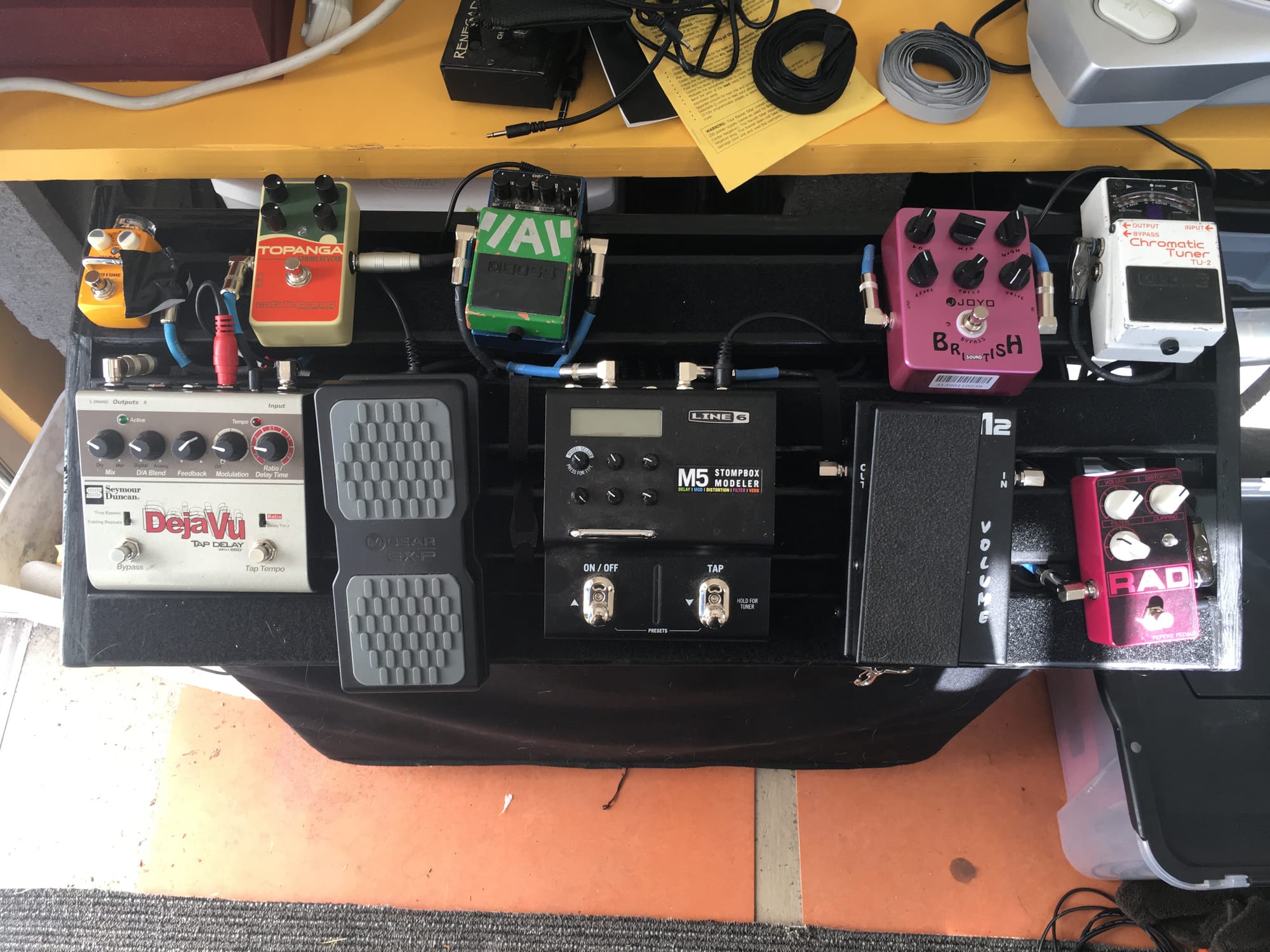
Over the course of the last year, I've really landed on a layout that I like. In order of the signal chain, here it is.
Boss TU-2
Not much to say about this. Fancy tuners come around every once in a while, but for accuracy, visibility, and durability, it's hard to beat the classic Boss.
Pepers Pedals RAD
This is a Rat pedal. Pretty simple. It's made by Tony Pepers in New Zealand, and when you buy his pedals they come with this amazing gummy candy that's only available there. There are standard Rat controls and a switch that changes the clipping mode from standard Rat to Turbo Rat, or removes the clipping altogether. Without clipping, it's decidedly less Rat-like but it's still a very hairy fuzz. I don't stack overdrives and distortions anymore. I just crank up a Rat.
Morley Mini Volume
I love the size of this thing. I always put volume pedals after the distortion, even though I sometimes can't get total silence with it rocked down, because that way the tone doesn't change when I fade it up and down. I do waffle on whether to put it in front of or behind my preamp pedal.
Joyo British Sound
Yes, this is 100% a ripoff, possibly a stolen board design, of the Tech 21 British pedal, and it's probably unethical to buy this or any Joyo pedal because even the original designs have been more or less funded by this kind of stuff. But damn, it cost me $20 and it helps add that throaty, low-midrange roar to my plain sounding solid state amp. Plus I can dial in just the right amount of gain so that even the clean tone has a tiny bit of breakup. That helps make my cleans a little softer on the attack and less obviously solid-state.
Line 6 M5
Line 6 is not exactly the most prestigious brand to put on your board, but this pedal is ridiculously useful for keeping said board from getting completely out of hand. I use it primarily for modulation and special effects. I currently use the M5 for the pitch detune effect at the end of "We Are The Life of the Future," and for wah/filter during "We Live Inside." Both of these use the M-Audio expression pedal that's plugged into it (another not-great brand but it's lasted longer than the Roland one I used to have). Beyond the tremolos, choruses, flangers and other modulators, there are some fun (if not super useful) synth sounds and other random effects. Any effect can have its settings changed with the expression, which makes it doubly useful. And it's true-bypass, so even if you're worried about Patented Line 6 Tone altering your signal, it's alright. Personally, I would never use the preamp and distortion sounds, they're just not that good, but for single-use sounds you don't want to add a whole pedal for... why not?
Seymour Duncan Deja Vu
This is a little-known delay with a hugely useful feature set and a great, live-friendly layout. There's tap tempo that can be set to either delay at the exact tempo you press, or at measure divisions, e.g. you tap the quarter note but it'll delay on a dotted eighth. It has an analog circuit simulator (cuts a lot of highs out of the repeats) with variable modulation (warble, basically) and you can dial any combination between the digital and analog for a lot of tonal variation. You can switch between tails or true bypass (I usually leave tails on and it doesn't really suck tone at all). As a bonus, cranking the delay speed knob way over will give you a looper function.
As if all that wasn't enough, you can plug a TRS into its "insert" jack and put a whole chain of effects there that will only effect the repeats. That's what the Boss PS-2 is doing there: adding either compounding delays or pitch shifts to the repeats. Insane possibilities.
It's basically the best delay pedal I've ever used, and the right combination of simple and powerful.
Catalinbread Topanga
I switch reverbs out sometimes but this one is too fun to leave at home. It's supposed to be an emulation of a Fender spring reverb unit. Yes, you can get some super wet Dick Dale sounds out of it. One of its more enjoyable features is that it's sensitive to volume and creates breakup as you feed it a louder signal. Made in Portland.
Hotone Wally
I may never figure out how to pronounce Hotone, but the Wally is a great little looper. You can stack a lot of loops of different times, you can change their pitch after you've recorded, and change the output volume of the playback. Great features for a tiny pedal. Unfortunately with its single button it's complicated to control and you can't end a loop at an exact time. And believe it or not, for most boards it's actually a little too small. I can't manage to get enough Velcro on the thing to keep it from moving around, and there's nowhere to zip-tie it.
TC Voicelive (not pictured)
The empty space usually has my vocal processor on it. This thing is basically just delays, but it has some sort of compression and possibly EQ in it because everything comes out of it sounding so polished. It was purchased by my bandmate from Mike Scheidt, so it's seen some action but it's really tough. Unlike many other vocal effects I've used, sound people do not hate it.
The Board
The board itself is a handmade wooden job that a friend built at a custom size for a pretty meager amount of money. I painted and velcro'd it, and even though it doesn't have a case and the slats can be a bit weird for the odd form-factor pedals like the Deja Vu, it's solid and really does the trick. The power supply is hidden out of sight and I have been able to velcro-tie the extra cabling. I just need to get an angled plug into that Topanga...