THE DAILY STREAM

Mike's site

Stuff and things

Latest updates
Newest first

No need for an abstraction layer with CSS Grid

Rachel Andrew, the Guru of Grids, on why you don't need a "Grid Framework" to use CSS Grid. For me, part of the desire to use grid is right here — the additional overhead of throwing in a grid system is just unnecessary. And with Grid comes horizontal and vertical alignment, markup without containers, and so many more possibilities for layout.

Even fallbacks, one reason frameworks tend to get popular, aren't needed in her estimation:

Create solid markup, uncluttered by additional elements that the past tells you that you need. Design your site using what Grid and other new methods have to offer. Then look at how you deal with the browsers without support, by serving them something slightly simpler.

Now that Edge fully supports Grid, it's probably time to stop farting around and really learn it, now that I've finally embraced flexbox.

Discuss

Is the golden age of UX really over, and what does that really mean

Maybe the "golden age of UX" really is over. I think a better way to put it is that we've been discovered out here in our clubhouse and now we're gonna have to grow up and play ball with everyone else. But this widely-shared article from Marvel (a tool I like a lot) has missed the mark in a couple fundamental ways.

First, strategy is not for everyone. We did what I think is a great job designing strategy at D&B, and it was in itself a design challenge. But not everyone on the team was involved or wanted to be involved. Disparaging non-strategic UX as a "production" role is an insulting mistake. This is skilled practitioner stuff, and there are still very few people who are actually good at it. The fact that there are exponentially more UX designers out there doesn't mean there are infinitely more good ones, especially since new folks are being raised on hot takes. So trying to convince the relatively few good ones to move on to strategic roles in companies that still need their user advocacy is not gonna help those companies.

Especially if your next aim is to get those designers on the growth or marketing trains.

"Growth hacking" is what UX designers are destined for now? Or social media marketing? Turn me into glue now, then, thanks. UX efforts are necessary in all of these worlds, and product marketing is inextricably tied to product design — but the core tenets of UX are unaffected by Valley trends (like "growth hacking") or marketing efforts, which are famous for attempting to subvert the true needs of the user.

Let's not lose the voice of the user in an attempt to stay relevant to a fad-driven Product Hunting world. And if the going wisdom is "we solved that, time to move the talented designers on to growth hacking and marketing," then I'd consider that all the more reason why UX is still badly needed on the ground.

Discuss

On Mistral

I think the article itself disproves the thesis that Mistral is patently hateable— in fact the piece eased my own distaste for it. I am plenty old enough to remember a time before Comic Sans and Papyrus when Mistral was the only typeface to loathe.

One point that I think is key is that it was one of the few extant fonts, let alone ones that business owners had access to, that would approximate handwriting or graffiti. It's a big reason Comic Sans persists, and presumably why sites like Creative Market are flooded with handwritten custom typefaces. I find it hard to hate on small business owners who wanted their signs or truck stickers to be less brutalist. A world where an otherwise solid piece of art like Straight Outta Compton can be packaged in crap design is a more fun world, anyway.

Discuss

Stealing your way to original design with Dan Mall

Mall is a capable, arguably influential designer and writer on the web. It's always cool to see how the sausage is made, but even cooler to see that a person with his credentials has a framework for creative "theft" as a basis for starting new designs.

When you're experienced, you start to internalize these kinds of layout patterns. But while recently working on a website, I realized I hadn't designed one in a very long time and was pretty unfamiliar with the nuts and bolts of a site these days. This would've been a great way to get rolling, and I might try it for the next iteration.

Discuss

Inline validation considered harmful

Just kidding, this article didn't really use that word. And rather than an alarmist view, this is a fairly measured take. However, most of the arguments are actually against realtime (onblur) validation, not inline validation.

I spent two years dealing with some serious problems that were born entirely out of the fact that an application used realtime+inline validation. And that was primarily in a series of wizard-like dialogs, which really didn't make any sense (the pattern of "disable the continue button until validation is cleared" would've worked well).

Our problems included:

  • forms that didn't require a certain order to filling them out, but validation that did
  • false positives triggered by mouse actions that left users in an unresolvable state if they clicked "wrong"
  • field groups often in a false-positive state (point #4 in the article)

This isn't the same as saying that per-field validation is wrong, and I still strongly believe in that, but this article has a lot of solid points.

Discuss

Type on the web

Some great fundamentals here. Other than the wide trend toward cranking the size that's been going on for a few years, really solid type work on the web is only recently coming into its own. It's kind of like when Khoi Vinh popularized grids a few years back; it made me wonder how many folks in this business have even studied design. I think it's great when people with more formal knowledge spread it to the web.

When it comes to type though, it's only been recently that we've been able to have a real level of control over it.

Discuss

IKEA hacking for the studio

Any time that I spend recording these days tends to be remote, and mixing happens 100% in the box. So loading up the rack spaces in my mix desk with outboard gear doesn't make a lot of sense. Maybe it would if I had some rackmount synths, but I don't. I previously traveled to remote gigs in a giant Odyssey mixer case with 9 spaces on top and 6 on the bottom. It's ridiculous, even after adding casters, and near-impossible to load into the truck without risk of a hernia.

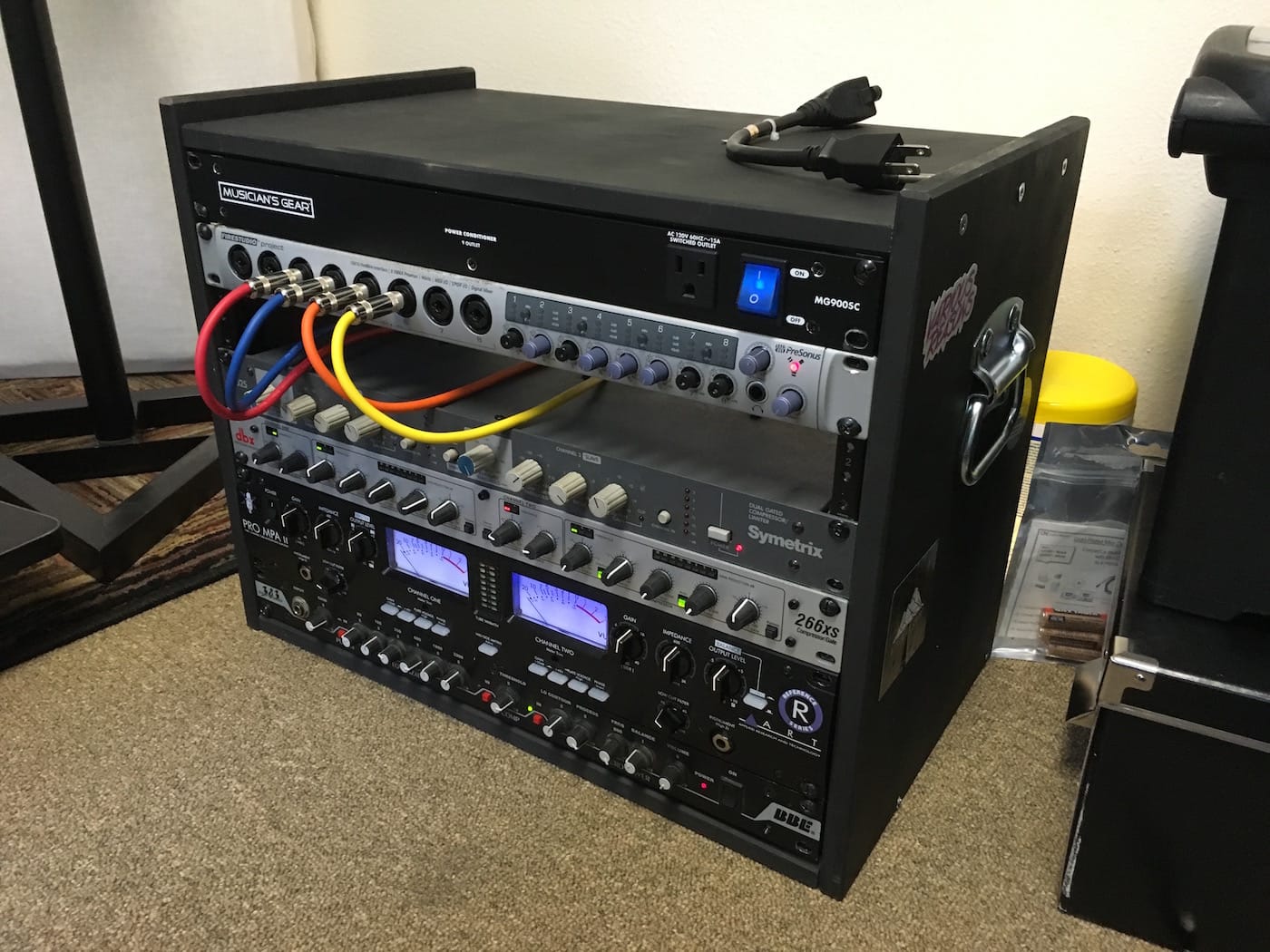
But even the smallest portable rack case is crazy expensive for my purposes. I'm not going on tour. I'll move it occasionally from recording location to studio and back, but it's never going "on the road." So after looking around I finally found this simple "IKEA hack." Conveniently, the Rast table is 19" wide on the inside and made of unfinished pine. Assembled as-is with some rack rails attached, it'll hold 6U worth of rack gear. But a slight modification lets it hold 8U. I added handles and a flourescent light in the back, spray painted it black, et voila, a stupid-simple case.

With the bigger items like my ART preamp, there isn't a lot of horizontal room left, but if I ever did this again I think I'd move the rack rails a little farther inside so the knobs were more protected. And for $15 at IKEA, I suppose I could make another attempt.

Cost breakdown:

  • IKEA Rast - $14.99
  • Rack rails - $6.96 x 2
  • Spray paint - $3
  • Handles - $3 x 2
  • Total: Under $45

Closest thing I could find pre-made: $130

FYI, my el cheapo signal chain, from the bottom up:

  • BBE bass EQ and preamp. I dislike the Sonic Maximizer and the "BBE Sound" in general, but this thing will even out a crappy bass guitar and give it some sustain and punch.
  • ART Pro MPA II (Gold Edition) mic preamp. ART get no love, but their black 2U tube units (MPA, VLA, Channel) sell for under $200 and they sound good. The Gold Edition swaps tubes for a less hissy gain. I mostly use it on vocals, but if you have to record a guitar direct it'll give you real tube gain, which will make any plugin amp simulator sound that much more authentic.
  • dbx 266xs compressor. I believe the "xs" stands for "extra shitty" when it comes to dbx's model line, but honestly it's still a dbx compressor. Which means it's pretty transparent and easy to use as well. For vocals I'll dial in some light compression when recording, but it's useful as a limiter as well if that's all you need.
  • Symetrix 525 compressor. I guess these things were originally for radio (duck the music as the DJ talks) but the sound is pretty darn good; I tend to use it to fatten/lengthen the sound of snares. Symetrix compressors have the distinction of being ultra-cheap (now and forever) but somehow approved by the GearSlutz community as useful tools.

Presonus Firestudio Project. I now have two of these interfaces because they're that good. For the money, it's almost impossible to beat the Presonus stuff. Decent gain on the preamps (could be better for vocals but that's what the ART is for), low noise, and pretty configurable and versatile. Chaining two is a breeze and gives you 16 mic inputs and 10 stereo outputs for a good bit less than a grand. I have never actually done remote recording with all 16, but in theory you could do a pretty good sized band at once.

Discuss

Switching to Studio One

💡
9 years later, I'm still on Studio One, even though it's called Fender Studio Pro.

I recently worked to record my band's new EP, and decided to do something I don't normally have the opportunity to do when someone's paying me: I changed my DAW.

Backstory: my Mac is starting to become inoperable due to the longstanding need for operating system updates. Recently Chrome decided it didn't like my version of Mac OS anymore. But if I start moving to the California editions, I have to switch to Pro Tools 12. And if you don't know what that means, imagine moving from Adobe CS to Creative Cloud. Yeah, I sunk a lot of money into Pro Tools and I'm not really into paying $25 a month or $300 for a year at this point.

So, I pulled out some old You Might Think We're Sharks base tracks from our last session that never got overdubs, and finished "Summer Moon" in Presonus Studio One, which I've been threatening to switch to for a while.

It went well, so I recorded An Empty Room's new one on it as well. There are some tradeoffs, but overall it's just a better experience and I wish I'd done it sooner. One thing I missed from Cubase is that the music creation and mixing portions were well integrated. In recent years since dropping Cubase, I tend to compose in Ableton, then finalize and mix in Pro Tools. In Studio One, though it's obviously not the same as Ableton, I'm able to integrate composition, tracking, and mixing pretty well. That works for our workflow since we'll add synths and samples in the mix process after doing the tracking.

The Pros:

  • Native compatibility with my hardware, which is made by Presonus as well.
  • Almost everything is faster. To send tracks to a bus, just select them all, right click, and select "Create Bus from selected tracks." No more routing.
  • Track presets and plugin groups (so you can save an entire chain of plugins that you use often).
  • Stock EQ has a frequency analyzer.
  • VSTs and AUs are invariably cheaper and more available than AAX.
  • Comping is incredible. Just highlight each part of the take ("Layer" in Studio One) you want to promote and it's done.
  • Fades are automatic (like Ableton), and they can be tweaked with bezier curves, as can automation.
  • Dragging and dropping, in most cases, replaces menus and routing. Even importing audio files: just drag them in, and when you save the file Studio One asks if you want to copy the audio files to the project directory.
  • As of version 3.4, there is a Smart Tool just like Pro Tools.
  • Macros.

The Cons:

  • I miss the single-stroke keyboard shortcuts. Leaving the modifier keys behind always made me feel like my keyboard was transformed into a spaceship control center. There are a few in S1, but not as many.
  • By that same token, keyboard focus is sometimes wobbly. You can search for plugins in the Insert/Send menus, which is amazing. But you can't reliably use the keyboard to select the one you find, and I end up selecting tracks, soloing them, etc.
  • Audio stretching is unintuitive.
  • No Beat Detective equivalent that I know of. I didn't use it that much anyway.
  • Nothing like Xpand! in the Artist version, but I recently picked up the VST version for a buck.
  • That's... about it.

I'm currently using Artist Edition with the iPad remote and VST plugin support upgrades. Most of the features that I would love to have in Pro Edition are not things that Pro Tools even had, like the Arranger Track.

Overall, it was a small curve, a relatively painless experience, and I didn't lose much for features. Certainly didn't lose any fun.

Discuss