
All postsAUTHOR

Mike

IKEA hacking for the studio

Any time that I spend recording these days tends to be remote, and mixing happens 100% in the box. So loading up the rack spaces in my mix desk with outboard gear doesn't make a lot of sense. Maybe it would if I had some rackmount synths, but I don't. I previously traveled to remote gigs in a giant Odyssey mixer case with 9 spaces on top and 6 on the bottom. It's ridiculous, even after adding casters, and near-impossible to load into the truck without risk of a hernia.

But even the smallest portable rack case is crazy expensive for my purposes. I'm not going on tour. I'll move it occasionally from recording location to studio and back, but it's never going "on the road." So after looking around I finally found this simple "IKEA hack." Conveniently, the Rast table is 19" wide on the inside and made of unfinished pine. Assembled as-is with some rack rails attached, it'll hold 6U worth of rack gear. But a slight modification lets it hold 8U. I added handles and a flourescent light in the back, spray painted it black, et voila, a stupid-simple case.

With the bigger items like my ART preamp, there isn't a lot of horizontal room left, but if I ever did this again I think I'd move the rack rails a little farther inside so the knobs were more protected. And for $15 at IKEA, I suppose I could make another attempt.

Cost breakdown:

  • IKEA Rast - $14.99
  • Rack rails - $6.96 x 2
  • Spray paint - $3
  • Handles - $3 x 2
  • Total: Under $45

Closest thing I could find pre-made: $130
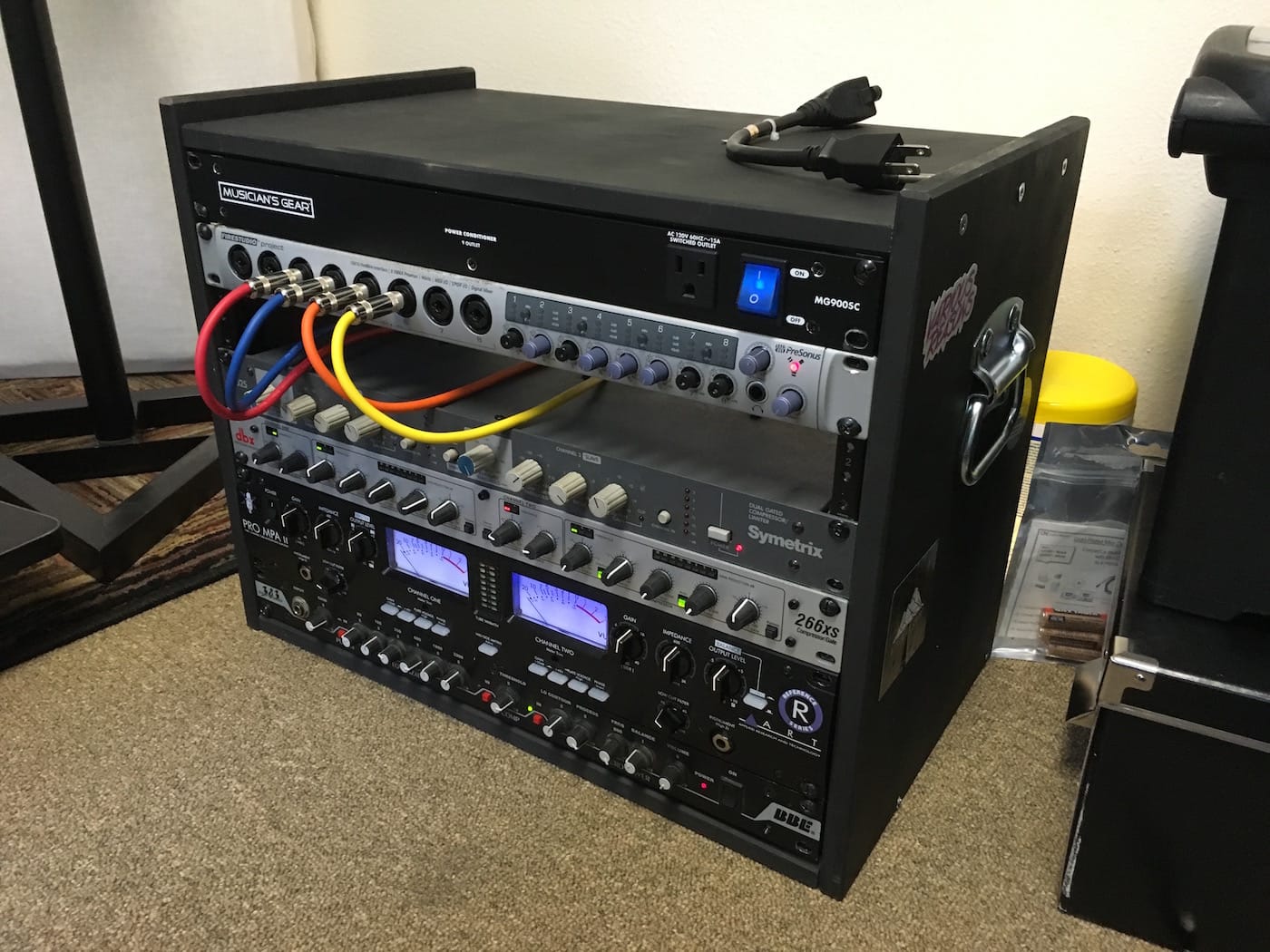
FYI, my el cheapo signal chain, from the bottom up:

  • BBE bass EQ and preamp. I dislike the Sonic Maximizer and the "BBE Sound" in general, but this thing will even out a crappy bass guitar and give it some sustain and punch.
  • ART Pro MPA II (Gold Edition) mic preamp. ART get no love, but their black 2U tube units (MPA, VLA, Channel) sell for under $200 and they sound good. The Gold Edition swaps tubes for a less hissy gain. I mostly use it on vocals, but if you have to record a guitar direct it'll give you real tube gain, which will make any plugin amp simulator sound that much more authentic.
  • dbx 266xs compressor. I believe the "xs" stands for "extra shitty" when it comes to dbx's model line, but honestly it's still a dbx compressor. Which means it's pretty transparent and easy to use as well. For vocals I'll dial in some light compression when recording, but it's useful as a limiter as well if that's all you need.
  • Symetrix 525 compressor. I guess these things were originally for radio (duck the music as the DJ talks) but the sound is pretty darn good; I tend to use it to fatten/lengthen the sound of snares. Symetrix compressors have the distinction of being ultra-cheap (now and forever) but somehow approved by the GearSlutz community as useful tools.

Presonus Firestudio Project. I now have two of these interfaces because they're that good. For the money, it's almost impossible to beat the Presonus stuff. Decent gain on the preamps (could be better for vocals but that's what the ART is for), low noise, and pretty configurable and versatile. Chaining two is a breeze and gives you 16 mic inputs and 10 stereo outputs for a good bit less than a grand. I have never actually done remote recording with all 16, but in theory you could do a pretty good sized band at once.

Discuss

Switching to Studio One

💡
9 years later, I'm still on Studio One, even though it's called Fender Studio Pro.

I recently worked to record my band's new EP, and decided to do something I don't normally have the opportunity to do when someone's paying me: I changed my DAW.

Backstory: my Mac is starting to become inoperable due to the longstanding need for operating system updates. Recently Chrome decided it didn't like my version of Mac OS anymore. But if I start moving to the California editions, I have to switch to Pro Tools 12. And if you don't know what that means, imagine moving from Adobe CS to Creative Cloud. Yeah, I sunk a lot of money into Pro Tools and I'm not really into paying $25 a month or $300 for a year at this point.

So, I pulled out some old You Might Think We're Sharks base tracks from our last session that never got overdubs, and finished "Summer Moon" in Presonus Studio One, which I've been threatening to switch to for a while.

It went well, so I recorded An Empty Room's new one on it as well. There are some tradeoffs, but overall it's just a better experience and I wish I'd done it sooner. One thing I missed from Cubase is that the music creation and mixing portions were well integrated. In recent years since dropping Cubase, I tend to compose in Ableton, then finalize and mix in Pro Tools. In Studio One, though it's obviously not the same as Ableton, I'm able to integrate composition, tracking, and mixing pretty well. That works for our workflow since we'll add synths and samples in the mix process after doing the tracking.

The Pros:

  • Native compatibility with my hardware, which is made by Presonus as well.
  • Almost everything is faster. To send tracks to a bus, just select them all, right click, and select "Create Bus from selected tracks." No more routing.
  • Track presets and plugin groups (so you can save an entire chain of plugins that you use often).
  • Stock EQ has a frequency analyzer.
  • VSTs and AUs are invariably cheaper and more available than AAX.
  • Comping is incredible. Just highlight each part of the take ("Layer" in Studio One) you want to promote and it's done.
  • Fades are automatic (like Ableton), and they can be tweaked with bezier curves, as can automation.
  • Dragging and dropping, in most cases, replaces menus and routing. Even importing audio files: just drag them in, and when you save the file Studio One asks if you want to copy the audio files to the project directory.
  • As of version 3.4, there is a Smart Tool just like Pro Tools.
  • Macros.

The Cons:

  • I miss the single-stroke keyboard shortcuts. Leaving the modifier keys behind always made me feel like my keyboard was transformed into a spaceship control center. There are a few in S1, but not as many.
  • By that same token, keyboard focus is sometimes wobbly. You can search for plugins in the Insert/Send menus, which is amazing. But you can't reliably use the keyboard to select the one you find, and I end up selecting tracks, soloing them, etc.
  • Audio stretching is unintuitive.
  • No Beat Detective equivalent that I know of. I didn't use it that much anyway.
  • Nothing like Xpand! in the Artist version, but I recently picked up the VST version for a buck.
  • That's... about it.

I'm currently using Artist Edition with the iPad remote and VST plugin support upgrades. Most of the features that I would love to have in Pro Edition are not things that Pro Tools even had, like the Arranger Track.

Overall, it was a small curve, a relatively painless experience, and I didn't lose much for features. Certainly didn't lose any fun.

Discuss

It's grid time!

Firefox and Chrome have now officially launched support for CSS grid. Months of saving Rachel Andrew talks in your Pocket account and saying "I'll get to that soon, it won't be ready for a couple years anyway" have finally paid off!

I'm kind of stoked to get into it. Here's a CSS-Tricks primer.

Discuss

Front End Style Guides by Anna Debenham

I'm still pretty into design systems and style-guide driven design, and I'm encouraged that the faddish nature of the conversation around these methods is passing into general wisdom and best practice. But there's still a lot of knowledge that has yet to be put "out there."

Brad Frost and Anna Debenham, who co-hosted a podcast together last year, are two of the biggest public proponents to recently release books on the subject. Whereas Frost's focuses more on the "why" and the philosophy of style-guide-driven design, Debenham's is very much a "how" book.

She first goes through some of the methodologies and techniques that help break designers of the nasty habit of designing by pages: style tiles, element collages, and component libraries. Then she covers the advantages of style guides.

From there, it's all practical. She focuses most of the book on the step by step process of implementing your first style-guide-driven redesign or creation of a component library. Throughout, she answers questions that real people doing real things with real style guides are going to ask: how rigid should I be, what tools should I use, what about maintenance once it's built... etc.

Overall, it's a short read but dense with useful, practical information from that rare breed — a developer who can write and explain concisely and clearly. If you've gotten on board the philosophical train of style guides but aren't sure where to start, it's a good buy at $8. Get it here.

Discuss

Don't Do It, No. 2137

Don't name your band after people that a lot of your audience considers the villains if you don't have any idea what you're talking about. Further... if someone calls you on it, at least pretend you did know what you were doing at the time (ex: George Lucas, who said 100% that the rebels were the Viet Cong), otherwise you're just a tool. It's almost like #145, "Don't pretend you don't understand why your use of Nazi imagery bothers everyone." (Hi Iceage).

Discuss