All postsEXPLORE TOPIC

#technology

Font Awesome buys Eleventy

I don't really even know what this means. Font Awesome does seem to be a pretty swell company as these things go, but even if they screw up monumentally, Eleventy being open source means that someone can easily fork the last version that we liked. I will probably continue using Eleventy for the foreseeable future because I like it.

Plus, comments

In other news, I added some comments to the blog. I don't know who reads it anymore, but it feels a bit out of touch with anyone who might because it just kind of lives out here on its own. I'm trying out a system called Chirpy, which is hosted but the code is open source and it doesn't have all the really sus junk that comes with Disqus.

Discuss

IT Professionalism

I've now been self-hosting some stuff for a while. It started small, with an old not-very-powerful machine and the urge to replace Google.

Easier said than done, right? Well, some of the process of implementing a "homelab" is straightforward and some of it is even easy — but none of it comes without escalation. And my latest, as we moved into a new house, was to implement Unraid on a new machine.

The benefit of Unraid is that it allows you to mix and match as many drive sizes as you want, which to my ears means "you have the ability to fill your bays with whatever crap you have lying around." It maintains what's called parity, and this allows swapping of drives even in situations where RAID arrays might make it difficult. I don't know a ton about this stuff, but I know that it's got a great UI, some best practices for security, and a built-in Docker manager. What it doesn't have, obviously, is a guide for how to make it aesthetic.

The Lab. It's not that pretty.
The lab. It's not that pretty.

The computer is a surprisingly powerful Beelink mini-pc with a 6-core Ryzen processor, and the drives are... again, what I have lying around. I am going to get a taller (8-space) bay to remove all these rando enclosures sitting around, but at the moment it's treating me well. Probably costs enough in power I could be paying Google, but it's the principle. Plus, it's really about control and privacy. Your stuff should be yours.

Favorite services:

Discuss

Zed's alive, baby

Promised for a while, finally Zed arrives. It's written by some of the creators of Atom, but instead of another Electron thing it's a very fast-performing app written in Rust.

It's multiplayer, apparently, which as someone who was once subjected to pair programming I've always found that a little weird. But it works for Figma, right?

Anyway, I wrote this post in it. Will be nice to see it appear on Linux, a platform that is surprisingly lacking in lightweight code editors. Between the anemic GEdit and a full blown IDE you have Lite XL, Microsoft's Electron-based VSCode, and of course the influential but non-free Sublime, which has persisted. I don't love any of them, but I'm liking this so far.

Discuss

Entering the last console generation the hard way

My son's friend just straight up gave him a Playstation 4 a few weeks back. I have no idea what the circumstances are in which you have too many PS4s, but there we are.

Unfortunately, it had been in storage for a while and someone had attempted a repair on it (for what? I don't know). So after buying a couple $5 games we found the CD drive just didn't want to work. I'm not the biggest fan of digital games because of course you don't actually own them, not to mention the drive sounds like it's gonna take off even if there's no disc in it.

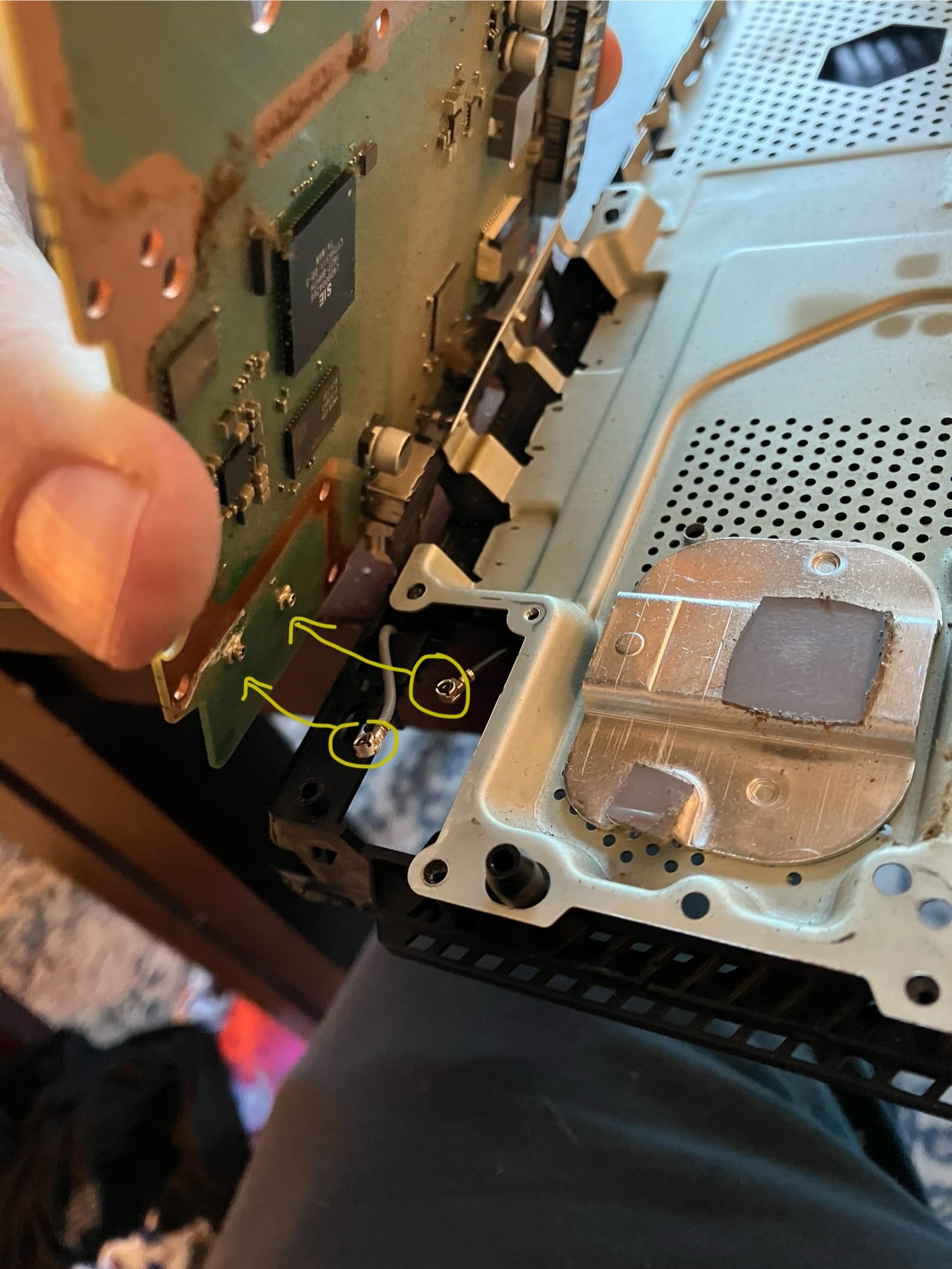
So I did what any insane person would do: I ordered a drive from iFixit, a site with a 40%-complete tutorial on how to replace it. Turns out, the actual method for replacing the optical drive in a PS4 Slim is "just take the whole god damn console apart." That quarter inch of thickness saved over the standard model comes at the expense of modularity.

Taking the thing apart

I also replaced the spinning 500GB hard drive with a 1TB SSD, which was no big deal — there's a sled that can be loosened with a single screw and any SATA laptop drive can be plugged right in.

Overall... significantly harder than upgrading a PC. But now we have a working PS4 and have been diving into Spider-Man (him) and Horizon: Zero Dawn (me), all for about $50 and some stressful tiny screw replacement.

Discuss

Building a useful homelab

A while back I started getting nervous about hosted services. Google starting to limit storage, Amazon killing off their music hosting, all of these were catalysts but a desire for privacy and a kind of old-school internet experience also drove my plans.

After some semi-successful experimentation with Plex on a Raspberry Pi, I started thinking about how the same priciple could be applied to other services, like photo galleries. Turns out that not only are there a ton of self-hosted, open-source options for doing a lot of things you might want to do, most of them have been containerized to run in Docker.

The components

A computer

My machine is not that powerful. It's a 4-core Pentium Lenovo Thinkstation with its main drive replaced with an SSD. It previously ran Mint desktop as a basic home computer. But after I got an old Macbook I didn't really need it, so it seemed like a perfect box to repurpose.

openmediavault

Far and away the most popular operating system for these kinds of boxes is openmediavault, a Debian distro with no desktop but a convenient web interface that allows even a relative dumbo like myself to mount drives and share them with services like SMB or FTP.

Portainer

As you might imagine, the web UI of OMV makes one want to do everything via your browser. SSH is not super hard, but it's mighty convenient to use Portainer, a great web UI for Docker.

The Software

Jellyfin

After spending what I consider to be too much money to watch my own stuff (PlexPass at $5/month), I went with Jellyfin, an open-source fork of Emby. I tell you what, we've come a long way since the old XBMC running on an overheating computer attached directly to the TV. It has clients for our computers, iOS and Android devices, and Roku, and perhaps because it doesn't need to do transcoding for those devices, the old computer barely even has to work when streaming to two different devices.

Music was never a strong point of Plex, though it was capable. Navidrome implements the Subsonic API, which is pretty well supported in a range of (admittedly varying-quality) third party apps, though it's better than Subsonic itself, which is Java. Is it your personal Spotify? Not quite, but close enough.

CUPS

Of course, right? We have a laser printer with no built-in network capabilities, and frankly we've had better luck using this old box than a dedicated print server from Monoprice.

Paperless-ngx

This is a really great document archive system that lets you specify all kinds of great metadata for finding your stuff when you need it (say, tax time or when the insurance company asks for documentation). An iOS app scans directly into it, where the server then OCRs all documents. From there, machine learning tools start trying to automatically apply metadata based on your defined patterns of text.

Duplicati

It's a GUI backup tool. Easy cheesy, and now all my stuff is backed up in Backblaze B2.

Photos

This is a whole other post. What a fun and frustrating journey.

Resources

It's hard to overstate the usefulness of /r/selfhosted as well as the subreddits for all the individual tools. Lots of people of varying levels of expertise willing to help.

If you have any questions on how I did some of this stuff, hit me on twitter/cohost/FB/whatever and I can try to explain it in my just-enough-to-be-dangerous way.

Discuss

One year with Obsidian

It occurs to me that I wrote this post about trying Obsidian about a year ago. In that time, I have not really strayed from it, which is pretty unusual for me. I get really restless with tools. Thanks to a very active plugin community, theme ecosystem, and subreddit, it's become a great tool that is super customizable. I adapted a few times and that was no biggie at all thanks to the fact that Obsidian is based entirely around discrete files, stored in your file system, with their own regular ol' file names.

My current way of operating is shamefully trendy; I'm using Tiago Forte's Building a Second Brain as the methodology. One reason is that it works reasonably well with other tools including paper journaling and Raindrop bookmarks. Though he apparently uses Evernote and swears by its search (which is still quite good despite Evernote's many problems), I think the linking features in Obsidian are really what makes it good for this system. Knowledge doesn't just go in a filing cabinet and get dusty. You can always see it thanks to links and unlinked mentions.

I'm still not interested in changing, and as long as I am still locked into the old $5 rate for syncing, I will keep that as well.

Discuss

Yes, Virginia, there is a Microsoft version of that

It can be tough when you're stuck in Windows world, with security lockdowns on your computer and a ban on most cloud services. With the notable exceptions of UserZoom, Figma, and Overflow, I'm in MS world and that's been an adjustment after the world of Google Apps and other lightweight, web-based tools.

There's a benefit to being entirely in Microsoftland, or at least in theory there is. Kinda looks like with the advent of Loop they are trying to make good on that theory and put it into real practice.

So to say that Loop is a Notion ripoff seems partially true. But for those of us stuck here in Office 365 with no hope of using the real thing, that's totally fine. Just like Planner is not Trello and Todo isn't quite what Wunderlist was, and Power Automate is far from being as easy to work as IFTTT or Zapier — but they exist. I can imagine a lightweight database table like what Notion employs would be so much easier for many of the small tasks where I'm using SharePoint Lists. But the "components" feature of Loop seems to be where MS are really trying to take it a bit further.

The idea behind components seems to be that the pieces of functionality (like Notion blocks?) are available elsewhere in the Office ecosystem: Teams chats, Word docs, email messages. And that's the kind of interoperability that we really don't enjoy today, even though that should be a prime selling point of Microsoftland. Mail Merge isn't exactly the future. But maybe Loop will be?

Discuss

Typora for Windows

I've now been on Windows at work for 3 years and finally found a notes solution that seems to work. I have a weird set of requirements:

  • I want it to look reasonably good if I'm looking at it all day
  • It has to support Markdown
  • It should support images
  • It should have a "notebook" interface
  • It can't use web sync because I work at a financial institution
  • I can't run installers (unless they're single-user) because my work machine is locked down

Finally, I found Typora. Insanely, it actually meets all these requirements, including a great notebook-style interface when you open an entire folder. Plus it has a few other features:

  • Document outline
  • Multiple themes (most of which aren't super great)
  • Export into HTML, PDF and all kinds of other formats

If you're on Windows or Linux, give it a shot. It's on Mac OS as well, but Mac users have such a glut of great markdown editors and notebooks (Bear and Byword are still among my favorites) that I'm not sure it's worth mentioning for them.

Update: I have moved away from Typora in favor of a complete knowledgebase approach of Obsidian, which is far more of a "notebook." Plus Typora has a cost and I can't buy stuff like this for my work machine.

Discuss

The great un-googling

They said it couldn't be done — removing yourself from Amazon. In truth, it mostly can't. If you use almost any web-based service, you're using AWS. And if you're like me, stretched out across multiple different platforms, you probably use some of those. But we stopped shopping there, I got a Kobo, and we're on the way to replacing our smart speaker. Honestly? Not that hard. Prime video is about the only true difficulty, especially since they have Star Trek

So, riding high on this pseudo-victory, I have declared I'm going to remove Google from my life.

Hashtag #goals

Here's the deal, though. I've read posts like this from people more tech-savvy and smarter than myself, and I don't think I can go that hard. It sounds... tough. I just want to stop depending on them, stop letting them see everything I do, and generally stop supporting them. There are so many reasons out there for doing so, but that's not what this is about. This is about a quest for alternatives to the company that practically wrote the book on doing stuff in the browser.

The pieces

Once you start cataloging it, there's a lot. And some are just gonna have to slide, no doubt about it, but I'll get there eventually. Here's where I'm at with alternatives.

  • Gmail. I looked at Proton, which is great if you really want to get into the extremes of privacy, and a few others, before settling on Fastmail. Fastmail won out for its UI, pricing to storage ratio, and inclusion of a calendar. Some friends' recommendations sealed that deal. Fastmail also features alias boxes, which can send or receive mail, and those are helping me get rid of the numerous random Gmail boxes in addition to the main one.
  • Docs. At the end of the day, I so rarely need a word processor and almost any will work. My personal hangup about docs is that I usually want structure rather than WYSIWYG layouts. It's a big part of why I use Notion Obsidian and frankly in most cases I'll just publish a PDF out of there. I write my post drafts in there since it's Markdown. But Apple's Pages online and MS Word online are totally fine, and more recently I found the hosted version of open-source OnlyOffice. As a bonus, it's a great replacement for the aging and frustrating LibreOffice on the Linux desktop.
  • Sheets. When Google Sheets launched, it was insane. Zoho had done it, but not well, and that's about it. There are all kinds of great tools out there now that make a spreadsheet seem quaint, but sometimes you just need a spreadsheet. It's still the "killer app." And the originator is still pretty good at it. Excel online is a little more computer-intensive, but it does the thing well and doesn't get into other stuff. Coda is a possibility, but the learning curve is steep, and I've seen recommendations for Airtable but as cool as it is (I use it for a few things) it's really a different animal. OnlyOffice wins again, for anything that needs more math and fewer relationships than I would handle with Airtable.
  • Drive. My god, it's full of storage. There are so many alternatives out there it's not even worth it. If you want to use the same provider as your docs or sheets, then go with Microsoft or Apple. If privacy is your main value, try pCloud or Mega. I've personally gone with pCloud because of its media capabilities and generous size (not to mention its charmingly rough edges and desktop Linux integration), but my eggs are well distributed among many baskets.
  • Photos. Unlike email, there just aren't a lot of low-cost storage options for photos. Flickr has been so fucked-with for so long since Yahoo! took over that I can't make heads or tails of where they're going with it, and most services (that aren't AMZ) are geared toward photographers, not regular folks backing up their stuff. So for now, I have nothing except redundant external drives and possibly a larger pCloud plan.
  • Chromebook. Obviously Google tracking your entire operating system is not super ideal. However, this was easier to resolve than I expected. Crouton makes it easy to install a Linux environment with xfce. I'm still tweaking but it's working pretty well, especially considering my Chromebook runs on a Rockchip, which I think is like an ARM?

The world of technology used to be this way. We used the best provider for each service or application. The idea of going to a one-stop shop is relatively new. Yeah, it makes things simple, but if the price for turning computing devices into dead-simple consumer electronics is all my privacy, I'm going to try to roll my own life.

Discuss

Reapin'

In the quest for audio perfection, I've found myself trying yet another tool.

This time it was thanks to a mastering project — at the end of the day I still ended up doing mastering in DSP-Quattro, an unreliable piece of software that nevertheless is a dedicated mastering DAW. When you need things like crossfades, effects on regions, and DDP export... you need them. It's another 300 bucks to upgrade Studio One to the version that has a mastering workflow, so guess who isn't doing that? I'm continually frustrated by DSP-Quattro's odd workflows and constant crashing, but it does the job eventually.

In the meantime, though, I gave REAPER a shot at it. If you're not familiar, Reaper (it's an acronym but I get really tired of capitalizing it) is a constantly-developing DAW that carries a $60 price tag for amateurs and $225 for pros. My impression of Reaper has always been that it's a technician's tool or "computer person" version of a DAW. That is to say, kind of the opposite of Pro Tools's heavy mimicry of a console-based workflow. One thing that its proponents are always fond of pimping is the customization. Reaper can, within reason, work any way you want it to, but there's a massive learning and setup curve to get there.

Or maybe not. Turns out, it isn't that hard to do a lot of the customizations that force Reaper to work the way you want to work, from tool behavior to making F3 toggle the mixer like Pro Tools.

It also sounds at least as good as Studio One, and has a much cleaner, more native-feeling interface than it used to. And I think that the the "computer-like" focus of the UI as opposed to slavish console worship is actually a strength. There are no audio or MIDI tracks, just tracks, and there are no groups, VCAs, or busses. Every track can be anything, so it supports an "as you go" creative workflow. Takes and playlists work easily.

The shortcoming that most DAWs run up against versus Pro Tools is always audio editing, so that remains to be seen.

I'm going to continue any client work that comes along in Studio One, but try the next An Empty Room recording with Reaper and see how it goes.

Discuss