All postsEXPLORE TOPIC

#audio engineering

Reapin'

In the quest for audio perfection, I've found myself trying yet another tool.

This time it was thanks to a mastering project — at the end of the day I still ended up doing mastering in DSP-Quattro, an unreliable piece of software that nevertheless is a dedicated mastering DAW. When you need things like crossfades, effects on regions, and DDP export... you need them. It's another 300 bucks to upgrade Studio One to the version that has a mastering workflow, so guess who isn't doing that? I'm continually frustrated by DSP-Quattro's odd workflows and constant crashing, but it does the job eventually.

In the meantime, though, I gave REAPER a shot at it. If you're not familiar, Reaper (it's an acronym but I get really tired of capitalizing it) is a constantly-developing DAW that carries a $60 price tag for amateurs and $225 for pros. My impression of Reaper has always been that it's a technician's tool or "computer person" version of a DAW. That is to say, kind of the opposite of Pro Tools's heavy mimicry of a console-based workflow. One thing that its proponents are always fond of pimping is the customization. Reaper can, within reason, work any way you want it to, but there's a massive learning and setup curve to get there.

Or maybe not. Turns out, it isn't that hard to do a lot of the customizations that force Reaper to work the way you want to work, from tool behavior to making F3 toggle the mixer like Pro Tools.

It also sounds at least as good as Studio One, and has a much cleaner, more native-feeling interface than it used to. And I think that the the "computer-like" focus of the UI as opposed to slavish console worship is actually a strength. There are no audio or MIDI tracks, just tracks, and there are no groups, VCAs, or busses. Every track can be anything, so it supports an "as you go" creative workflow. Takes and playlists work easily.

The shortcoming that most DAWs run up against versus Pro Tools is always audio editing, so that remains to be seen.

I'm going to continue any client work that comes along in Studio One, but try the next An Empty Room recording with Reaper and see how it goes.

Discuss

IKEA hacking for the studio

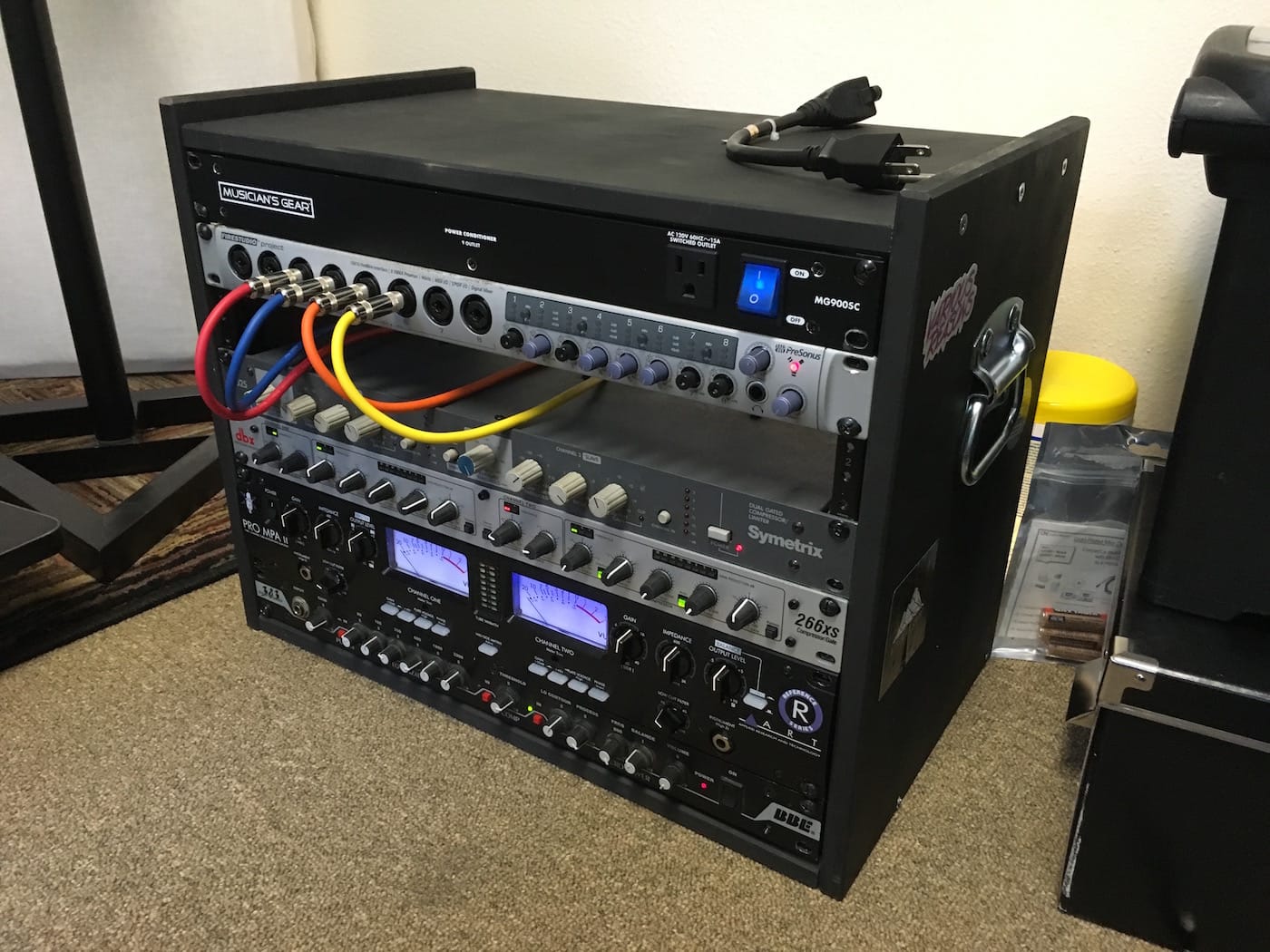
Any time that I spend recording these days tends to be remote, and mixing happens 100% in the box. So loading up the rack spaces in my mix desk with outboard gear doesn't make a lot of sense. Maybe it would if I had some rackmount synths, but I don't. I previously traveled to remote gigs in a giant Odyssey mixer case with 9 spaces on top and 6 on the bottom. It's ridiculous, even after adding casters, and near-impossible to load into the truck without risk of a hernia.

But even the smallest portable rack case is crazy expensive for my purposes. I'm not going on tour. I'll move it occasionally from recording location to studio and back, but it's never going "on the road." So after looking around I finally found this simple "IKEA hack." Conveniently, the Rast table is 19" wide on the inside and made of unfinished pine. Assembled as-is with some rack rails attached, it'll hold 6U worth of rack gear. But a slight modification lets it hold 8U. I added handles and a flourescent light in the back, spray painted it black, et voila, a stupid-simple case.

With the bigger items like my ART preamp, there isn't a lot of horizontal room left, but if I ever did this again I think I'd move the rack rails a little farther inside so the knobs were more protected. And for $15 at IKEA, I suppose I could make another attempt.

Cost breakdown:

  • IKEA Rast - $14.99
  • Rack rails - $6.96 x 2
  • Spray paint - $3
  • Handles - $3 x 2
  • Total: Under $45

Closest thing I could find pre-made: $130

FYI, my el cheapo signal chain, from the bottom up:

  • BBE bass EQ and preamp. I dislike the Sonic Maximizer and the "BBE Sound" in general, but this thing will even out a crappy bass guitar and give it some sustain and punch.
  • ART Pro MPA II (Gold Edition) mic preamp. ART get no love, but their black 2U tube units (MPA, VLA, Channel) sell for under $200 and they sound good. The Gold Edition swaps tubes for a less hissy gain. I mostly use it on vocals, but if you have to record a guitar direct it'll give you real tube gain, which will make any plugin amp simulator sound that much more authentic.
  • dbx 266xs compressor. I believe the "xs" stands for "extra shitty" when it comes to dbx's model line, but honestly it's still a dbx compressor. Which means it's pretty transparent and easy to use as well. For vocals I'll dial in some light compression when recording, but it's useful as a limiter as well if that's all you need.
  • Symetrix 525 compressor. I guess these things were originally for radio (duck the music as the DJ talks) but the sound is pretty darn good; I tend to use it to fatten/lengthen the sound of snares. Symetrix compressors have the distinction of being ultra-cheap (now and forever) but somehow approved by the GearSlutz community as useful tools.

Presonus Firestudio Project. I now have two of these interfaces because they're that good. For the money, it's almost impossible to beat the Presonus stuff. Decent gain on the preamps (could be better for vocals but that's what the ART is for), low noise, and pretty configurable and versatile. Chaining two is a breeze and gives you 16 mic inputs and 10 stereo outputs for a good bit less than a grand. I have never actually done remote recording with all 16, but in theory you could do a pretty good sized band at once.

Discuss

Switching to Studio One

💡
9 years later, I'm still on Studio One, even though it's called Fender Studio Pro.

I recently worked to record my band's new EP, and decided to do something I don't normally have the opportunity to do when someone's paying me: I changed my DAW.

Backstory: my Mac is starting to become inoperable due to the longstanding need for operating system updates. Recently Chrome decided it didn't like my version of Mac OS anymore. But if I start moving to the California editions, I have to switch to Pro Tools 12. And if you don't know what that means, imagine moving from Adobe CS to Creative Cloud. Yeah, I sunk a lot of money into Pro Tools and I'm not really into paying $25 a month or $300 for a year at this point.

So, I pulled out some old You Might Think We're Sharks base tracks from our last session that never got overdubs, and finished "Summer Moon" in Presonus Studio One, which I've been threatening to switch to for a while.

It went well, so I recorded An Empty Room's new one on it as well. There are some tradeoffs, but overall it's just a better experience and I wish I'd done it sooner. One thing I missed from Cubase is that the music creation and mixing portions were well integrated. In recent years since dropping Cubase, I tend to compose in Ableton, then finalize and mix in Pro Tools. In Studio One, though it's obviously not the same as Ableton, I'm able to integrate composition, tracking, and mixing pretty well. That works for our workflow since we'll add synths and samples in the mix process after doing the tracking.

The Pros:

  • Native compatibility with my hardware, which is made by Presonus as well.
  • Almost everything is faster. To send tracks to a bus, just select them all, right click, and select "Create Bus from selected tracks." No more routing.
  • Track presets and plugin groups (so you can save an entire chain of plugins that you use often).
  • Stock EQ has a frequency analyzer.
  • VSTs and AUs are invariably cheaper and more available than AAX.
  • Comping is incredible. Just highlight each part of the take ("Layer" in Studio One) you want to promote and it's done.
  • Fades are automatic (like Ableton), and they can be tweaked with bezier curves, as can automation.
  • Dragging and dropping, in most cases, replaces menus and routing. Even importing audio files: just drag them in, and when you save the file Studio One asks if you want to copy the audio files to the project directory.
  • As of version 3.4, there is a Smart Tool just like Pro Tools.
  • Macros.

The Cons:

  • I miss the single-stroke keyboard shortcuts. Leaving the modifier keys behind always made me feel like my keyboard was transformed into a spaceship control center. There are a few in S1, but not as many.
  • By that same token, keyboard focus is sometimes wobbly. You can search for plugins in the Insert/Send menus, which is amazing. But you can't reliably use the keyboard to select the one you find, and I end up selecting tracks, soloing them, etc.
  • Audio stretching is unintuitive.
  • No Beat Detective equivalent that I know of. I didn't use it that much anyway.
  • Nothing like Xpand! in the Artist version, but I recently picked up the VST version for a buck.
  • That's... about it.

I'm currently using Artist Edition with the iPad remote and VST plugin support upgrades. Most of the features that I would love to have in Pro Edition are not things that Pro Tools even had, like the Arranger Track.

Overall, it was a small curve, a relatively painless experience, and I didn't lose much for features. Certainly didn't lose any fun.

Discuss

Live recording with local band the Nouns

Building up a portfolio of recorded, mixed work is not always done by traditional routes. That's especially true when your primary selling point as a recordist is mobility. I would probably love to get nothing but mix jobs — the work is fun, solitary, and low-pressure as long as you meet deadlines — but the challenges that take me out of my comfort zone are a big part of what make recording interesting.

The Nouns are a hip-hop and jazz crossover with elements of rock and R&B. They have a level of accessibility that jazz groups don't often achieve, and their talent level is sky-high. Their lineup consists of drums, keys, bass, sax, jazz singer (with some R&B/soul flavor) and an MC.

My strategy would be to mic them up for multi-tracking but not to get too angsty about bleed. They performed in a barely acoustic-treated music classroom at the University for a video shoot.

Challenges

The first unique aspect of this session would be running live sound in a small room while simultaneously recording. The drums didn't need amplification, and the bass and keyboard player both had amps. So I piped everything through my computer in the normal recording chain and produced two separate mixes. I ran a mix of just vocals and saxophone out to three channels of the PA for "house" sound. Then I gave my headphones everything. This worked surprisingly well with Presonus's Universal Control. It enables up to 4 mixes, but it's notoriously crash-happy the more you do with it. Thankfully, it held together enough to give me a 3-channel PA routing while recording all 8 channels of audio.

The bass and keys were easy to record: their amps had DIs and I recorded them direct. I loathe DI'd bass sound most of the time, but a little love from EQ in the mix usually helps and practicality won the day this time.

Mics

For the sax, a Beta 57 positioned a few inches off the bell and at the middle of the horn gave me a surprisingly good sound with minimal effort. I got tonality, articulation, and detailed reediness.

I stuck a pair of SM81s in an XY pattern over the drummer's head. I was able to get them fairly close, given that he's a jazz drummer with little to no arm swing. The XY of course keeps everything in phase, but it turned out to be a great fit for a unique kit. He uses two snares side by side, and no toms. I supplemented the kit with my old Oktava LDC in the front of the kick. The resulting sound has maybe more room sound than I would care for, and the hats are a bit wild on a couple songs, but it serves the musicality and dynamic range of the jazz style playing.

The singers each got an SM7B. This is a mic I had no experience with but I was pleased. Though it's a dynamic, it has a lot of detail and really requires a preamp to pull everything out of it. I put it through my cheapo ART Tube MPA preamp (tube-swapped to minimize noise) and my Symetrix 525 compressor/gate. I only took the biggest peaks off; the SM7B's sound is so smooth, it almost sounds like it's been hit with a compressor already. The MC gave a great delivery, and I cranked the tube preamp to give him a touch of grit. I had so much drum bleed in the singer's mic that even the gate wasn't helping. It's possible I should have switched her to a handheld, but even changing her position in the room may have helped. You live and learn. At the end of the day, though, an LDC would never have worked and an SM58 wouldn't have been very exciting.

Mix

I've been into the idea recently of "console-style" mixing. Initially I tried in the obvious choice, the new (v3) version of [Harrison Mixbus](http://harrisonconsoles.com/site/mixbus.html), but despite some huge improvements in performance it's still not quite ready for primetime. I will continue to experiment with it.

Slate

The "console" mentality proved a great way to justify trying out the new Slate subscription plugin program. While Avid is getting a lot of flak for moving to a subscription based model for all versions of Pro Tools going forward, Steven Slate is proving that execution (and a lot of brand good will going into it) can make all the difference.

The Slate VMR and VCC really tied the sound of all the tracks together, and the 3 EQs (SSL and Neve) and two compressors (Opto and 1176) available in VMR are about what I'd normally use. Since this project wouldn't be mastered, the Slate FG-X would let a non-mastering-engineer like myself put the final touch of volume and polish on the tunes.

Other Plugins

Despite the closeness of the overheads, I feel like the XY pattern gave me a bit too much room sound and the room really wasn't a great one. So I hit them with a bit of Tokyo Dawn's Proxmity plugin, an ingenious combo of reverb, compression, and EQ that can make sources sit closer or farther away in the mix. For the bass, I shamelessly applied Waves Renaissance Axx compression going into the Slate VMR. Surprisingly, I didn't use the Maag EQ4 on the singer. This had a lot to do with the drum bleed throwing unwanted frequencies into her mic; I needed to do more surgery on specific frequencies. The Maag has smart frequencies but they're fixed.

Roundup

This was a challenging recording situation. But with the exception of a few specific issues, the mix came together well. So I might have done something right. More than any other session, Shure saved the day. The Beta 57, far from being a "just good enough" versatile mic, was magic on the sax. And I can understand why the SM7B is such a popular microphone. But the stars of the show were really the SM81s. The simple drum mic setup worked great for jazz, and might make me rethink how I deal with a rock kit next time.

Discuss

My favorite recent mixing plugins

The plugins I've been using lately have changed dramatically from when I started mixing. Sometimes I'm guilty of buying into hype, but I've started to discover what I like. And I'm always waiting for it to go on special...

Criteria

So what makes a good plugin? For me, it's less is more: less options, less possibilities to twiddle, and less graphical EQ curves. Sight is a strong sense, and it can fool even an experienced ear.

EQ

PSP Audioware McQ

This 4-band plus high/low filters isn't a true analog modeler, it's a hybrid. But it sounds great, is easy to use, and doesn't hit your processor hard. So really, it's safe to put on just about everything. Its bands are hard to read (Why is it ".10kHz" instead of "100Hz"?), but they're highly controllable. So you can do both broad strokes and somewhat detailed surgery.

Waves API 560

Under ideal cirumstances I'd have the whole Waves API 500 series bundle, but this one went on sale. It's fun to have a graphic EQ sometimes, especially one with only a few bands. It sounds great on a wide variety of sources too.

Waves Scheps 76

Another modeler, this one after a console. The gimmick is the integrated preamp. The bands aren't fixed on this EQ but the knobs have huge steps so you can only dial in a few possible frequencies each. The Qs are not variable. It sounds great on drums, especially kicks. Given those few bands, it's easy to crank the 60Hz and then throw one on the bass and drop the 60Hz there so they don't fight. The preamp section can add smooth overdrive to the bass as well.

Maag EQ4

An incredible EQ. It's got four fixed bands, a fixed Q, and some frankly weird frequency choices. But those bands were supposedly picked to cause the least amount of phase effects. It sounds absolutely magical. It's possible I bought into the hype with this one, but I got a deal and I can't say I feel any regret. I do feel almost guilty using it though; it requires barely any thought to make vocals, acoustic guitars, and even some drums sound amazing.

Nomad Factory PulseTec

Nomad Factory is the Rodney Dangerfield of plugin companies. I'm not sure if this thing sounds remotely like a real Pultec but it goes on all my master busses. It was completely bonkers to me at first to be able to simultaneously boost and cut the same frequencies, but man it does the trick. Not great on the top end (the Maag can handle that), but it thickens and tightens mids and low-mids.

Tokyo Dawn Labs SlickEQ

Another super transparent phase-free EQ, but this one is geared toward the master buss and costs nothing.

Dynamics

Waves CLA-76

I waited a great long while for this to go on sale. I've always wanted an 1176 that wasn't the Bomb Factory BF76 that comes with Pro Tools. It's everything I wanted it to be and I use it everywhere — primarily drums but it'll tame a problematic source quickly and with character. At its full price, it probably still wouldn't be bad.

Waves Renaissance Axx

I wonder how many people use this thing. I mean, everyone's got the Native Power Pack, right? But Renaissance Axx is one of those tools that feels like cheating. Just slide the threshold down and watch it magically even out guitars and basses. It uses so little processor I get pretty generous slapping it on guitar tracks. I've heard a few pros cop to using this thing and why the hell not?

T-Racks Opto Compressor

IK Multimedia is another company that gets a lot of poop from people. But I've had their opto compressor for a long time and it's one of my favorite tools for vocals. It can open up a weak track by an inexperienced vocalist who's all over the place or who didn't project. You can get miles of compression out of the thing with much more transparency than an 1176. Sometimes I'll double a difficult vocalist's track, overdrive it, crank the mids and highs with a smooth EQ like the Maag, and then flatten it out with this compressor. Mixing in a little bit of that adds presence and is probably a super old trick not worth mentioning. But this is a good comp to do it with.

Tokyo Dawn Labs Kotelnikov

I'm still learning this feedback compressor, but it's smooth and transparent. You almost have to watch the meters to see that it's compressing, but it can make the master buss sound great. And though you can spring for the "Gentlemen's Edition" (?), the basic version is super great and costs zero dollars.

DDMF The Strip

This is actually a full channel strip so it's both and EQ and compressor, in switchable order. It has a Neve look and that's the starting point for the modeling. But this amazing plug goes a little farther into original territory than most models. DDMF is one of the few developers who can get away with charging next to nothing for plugins yet still get respect from GearSlutz. I got it for $30 as a launch special and I'm crazy impressed. Even the knob motion reveals just how much thought went into this. The developer is also a mixer, and it shows.

Flux Bittersweet

Sometimes you need simple transient shaping that'll get the job done without interfering with other dynamics processing. How's one knob? How's free? It sounds nice too.

Other Stuff

Blue Cat Patchwork

The Blue Cat folks make some great stuff. This is a simple but flexible plugin chainer that gives me solid performance loading VSTs or AU plugins into Pro Tools. DDMF's Metaplugin would also do the trick, probably very nicely as well.

Blue Cat FreqAnalyst and IK T-Racks Meters

With these two free metering tools, I can monitor what my sound "looks like" for the low cost of free.

Discuss

Harrison Mixbus first impressions

I've never worked on an analog console. Sure, I've sat with someone and suggested technical and creative engineering decisions while they operated, but the UI paradigm of a console is only useful to me because I've used desktop mixers, and because pretty much all DAWs use some form of this paradigm. I don't have any allegiance to the old ways or the "sound" factor that usually consists of a bunch of vague assertions that analog summing is better (usually coupled with assertions that tape is better as well).

But what I do have is that drive to find the better workflow, the fastest way to creativity mixed with the ability to generate results. I also can't pass by a deal. For a $20 "no brainer" deal, it was certainly worth trying out Harrison Mixbus, even though Pro Tools is the standard and is a generally satisfying experience once you learn it.

The origins of Mixbus are interesting enough on their own: the project was born from an open source Linux DAW called Ardour. The Harrison console company, known for their super high end consoles used on a huge amount of popular records, used the existing open codebase as a skeleton that they fleshed out with their own EQ, compression/leveling, saturation, and summing algorithms.

Out of the box

Installing is a minor pain due to the requirement of a JACK installation, and subsequent restart. JACK is a system-level audio router that's somewhere between Soundflower and Propellerheads' ReWire. Apparently Ardour needs it to route from an audio interface to its own tracks. This means the JACK server, really a separate piece of software, has to run at the same time as Mixbus, but a side benefit is that audio can pretty easily be routed into it from other applications.

Why's that important? Well, to me it's important because Ableton handles all of my composition work, and Ableton is not that great at mixing compared with a package like Pro Tools. Unfortunately, ReWire mode in Ableton disables all the VST/AU plugins, rendering a good chunk of my instruments unusable. So I usually end up rendering audio tracks from Ableton and mixing those in PT, which is not necessarily going to get me the best results, aside from being a crappier workflow. I haven't yet gotten Mixbus controlling the transport in Ableton, but it does seem possible.

UI

Ardour was built originally for Linux. Thankfully, the Mac OS version does not require X11 or a Java VM. It hardly appears "native," though. The reverse-color scheme, the Gnome-style file pickers and very Linux-y UI components are alien, distracting, and not very impressive. Keyboard shortcuts aren't intuitive either: some are borrowed from Pro Tools and that helps, but system-wide commands like Command-backtick for window switching, or even Command-W and Command-H, are nowhere to be found. Many of the commands use Option as their modifier key, which is awkward. Still, a lot of the editing functions are single-key, something that absolutely has to be the case before a DAW can even sit in the same room with Pro Tools. I suppose I could probably re-map them to their PT equivalents, too.

By far the thing you'll notice about the UI the most is the mixer. I've written about skeuomorphs in audio software before, and it's all the same here. Harrison love to tout that they're a console maker, not a software maker, but that works both ways, and their application of a heavy, quasi-realistic mixer design has me gazing longingly at the screenshots of Ardour's relatively clean and straightforward (almost Ableton-esque) mixer. But as they'll tell you, this is a thing meant to replace an analog mixer, and the affordances (in the Norman sense) offered by the skeuomorphs help the special features come forward. In a way, it seems like they're intentionally reaching backward, and you can feel it when you mix.

Fast Access

First off, there's the impressive list of built-in elements on every channel strip, and I admit this is something that I'd probably miss if I were coming from the console world. I'm already enjoying them. In a typical DAW, pretty much everything, with the exception of EQ in some cases, is a plugin.

But in Mixbus, we get a lot:

  • Input gain independent of the fader or the clip gain.
  • a 3-band parametric EQ plus high-pass filter.
  • A compressor with three ratio types, speed control, and makeup gain. The threshold control and gain reduction meter sit right next to the fader and level meter.
  • A number of parameters from the selected insert plugin on the channel.
  • On the 4 mix busses and one master bus, there are tape saturators and different compressors tuned for the purpose.
  • On the master bus, a phase alignment meter and "K-meter" to measure perceived loudness.

What all of this accomplishes is a mix process that involves far less instantiation of plugins, far less opening of separate windows, and a workflow that keeps you looking at the mixer and maintaining a holistic picture of the mix most of the time. This is of course Harrison's goal, and I think they've met it well.

The major downside to this mixer is that there are only 4 "mix busses." You can add any number of busses for reverbs and other effects, but only the mix busses have delay compensation. That means a lot of multiple-bus tricks that analog and PT users employ, such as parallel compression, are out of the picture due to the phasing that'll happen without delay compensation.

But how does it sound

Again, I admit to knowing little about the console world. I've never wired one, and my understanding of routing and bussing comes largely from years of Pro Tools. Mixbus mirrors the real thing even more closely than PT, which provides both benefits and limitations (as with the limited mix busses). So what does it do for the sound?

I have to say, I've been impressed so far. But I'm not quite sure if it's the much-touted Harrison summing engine or whether the availability of the tools has let me get a good mix faster. Having EQs out front is important because you're tempted to use them. And most tracks are really going to need at least a little, but that tiny thought that pops up when you add a plugin creates enough of a barrier that you might skip it. And when you do add a plugin, it's probably going to have quite a few bands, and a distracting graphical display that makes you think you're doing something right because the curve "looks good" even though you might need more or less on a given band. Mixbus's basic EQ has two shelves and a bandpass that work in limited ranges, a Q that varies based on the amount of boost/cut, and a high-pass. Simple. No controllable Q, no ability to put all 3 bands in the high frequencies and create an insanely hyper-tweaked situation. Of course you can still do all that with the same plugins you know and love now, but you can get a really good mix just by carving each channel as necessary and then applying little touches of the onboard compression.

Performance

Unfortunately, there are some problems on the performance front. I was able to do some very quick mixes efficiently that sounded great without a lot of hassle, but with tunes that had about 6 tracks and not a lot of plugins (thankfully, you don't need as many plugins with Harrison). But when a client delivered me some songs with 27+ tracks to mix, it died pretty quickly. The meters don't respond, moving knobs and faders ceases to really do anything — the latency all around just gets ridiculous.

Side by Side?

At the end of the day, Pro Tools still has a lot going for it. I find myself doing a lot of wild and (IMO) creative stuff in PT when it comes to routing and bussing, stuff you just wouldn't be able to do with an analog console — or a DAW that mirrors one too closely.

And though I don't do a lot of MIDI work inside PT, I definitely have done some, and it's good to know it's there. I can add a nice synth to a track without going crazy routing multiple programs.

Mixbus also has some good editing tools, some of which are minor UI innovations and others of which are cribbed from PT, but PT is a much faster and more powerful editing machine. It's also one that I know already whereas I've played with Mixbus for about 3 days. I've no doubt I could get pretty handy with the flexible editing functions in Mixbus as well.

At the end of the day, it's a great mixer, competent editor, and it sounds very good with no supplemental software. If you're looking to make great sounding tracks for a lot cheaper than Pro Tools and don't need MIDI functionality beyond sync, it's a really compelling tool.

And it's fun.

(Harrison's YouTube channel is an easy way to get started playing with real practical functionality within a few minutes. The videos are short and informative, and even have some helpful general mix tips.)

Discuss